

Delete an email
Short answer
Choose Delete email from the three dots on the email’s card and confirm; the email and its results are gone for good. If it’s scheduled or sending, Jounce stops the send first and deletes nothing until it confirms the stop.
When you’re done, the email is gone from the Emails page and from any folder it was in. If it was scheduled or sending, its send stops too.
-
Open Emails and find the email.
-
Select the ⋯ (three dots) on its card, or at the end of its row.
-
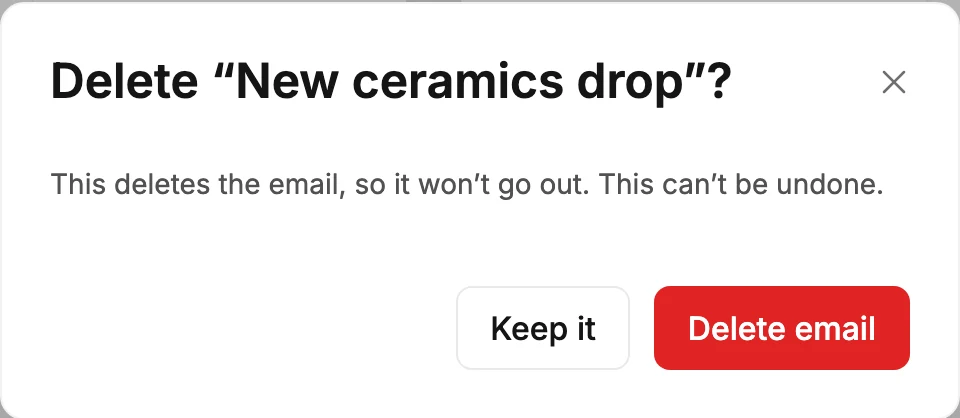
Choose Delete email. A window names the email and says what deleting it does.
-
Select Delete email, or Keep it to change your mind. The window stays open until Jounce has deleted the email.
What the window says
Its line follows the email’s status label, and every line ends This can’t be undone.
- Draft: This deletes the email.
- Scheduled, or a send Jounce is holding before anyone gets it, such as Won’t send: This deletes the email, so it won’t go out.
- Sending or Sending winner: This stops sending and deletes the email and its results. To keep both, cancel sending instead. Everyone who has it keeps it, and some people may still get it before sending stops.
- A/B testing, or a test Jounce is holding, such as Won’t finish: This deletes the email and its results. To keep both, cancel sending instead. Your test group keeps it, and the rest of your list never gets the winner.
- Sent, Partly sent, Failed, or Canceled: This deletes the email and its results.
If it’s scheduled or sending
Jounce cancels the send before it deletes anything. It deletes the email only once it confirms the send stopped, or had already ended. If it can’t confirm that, your email stays, and the window says so.
A send already going out stops as soon as Jounce can, so a few more people may still get it. Anyone who already has it keeps it.
To stop the send and keep the email and its results, see Cancel a scheduled or sending email.
Careful Deleting a sent email deletes its results too. To keep the numbers, keep the email and file it in a folder instead. See Organize emails and forms with folders.
Managers and Admins see Delete email. If it’s missing from your menu, or the delete fails, see Why can’t I delete an email?
Next step
To tidy up and keep everything, see Organize emails and forms with folders.
More in this topic
Updated