

Test two subject lines
Short answer
On the Subject step, select Test two subject lines and add a second one. Jounce sends each to part of your list, then sends the subject with more clicks to everyone else 24 hours later.
When you’re done, the send button reads Start A/B test, and your Emails page shows the email as A/B testing while it runs.
-
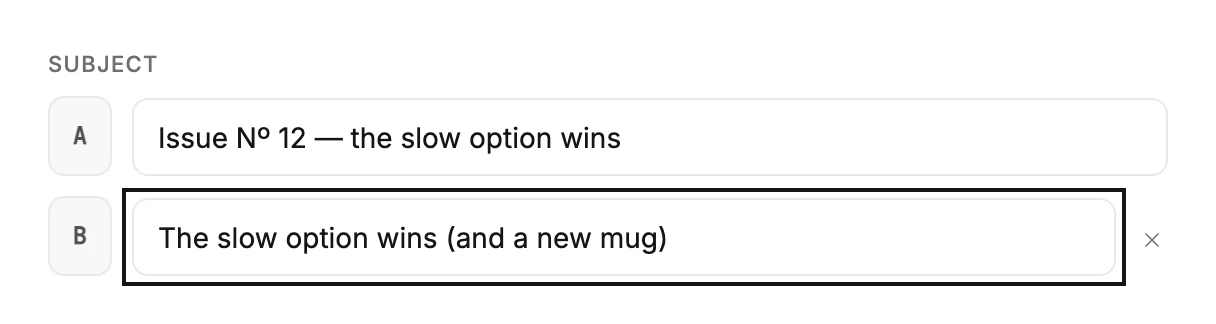
On the Subject step, select Test two subject lines, under the subject field. Two fields appear, lettered A and B.
-
Your subject is already in A. If Jounce’s AI wrote your email, B already holds a second subject that says the same news another way. Keep it, change it, or write your own. Otherwise, write a second one in B.
-
Select Continue. The Review step shows both lines, A · and B ·, in its Subject row.
-
Under When, keep Send now, or choose Schedule to start the test later.
-
Select Start A/B test, or Schedule A/B test for the time you picked.
To go back to one subject, select the close button beside B. Its label is Remove subject B.
How Jounce runs the test
Jounce splits part of your list into two equal test groups and holds the rest back. Group A gets subject A, group B gets subject B, and both go out at the same time. The Review step says what happens next: The subject with more clicks goes to everyone else 24 hours after the test goes out.
Clicks decide, not opens. Many mail apps open an email on their own to fetch images, so opens don’t tell you which line worked. On an exact tie, subject A goes to everyone else.
A small list is split in half instead. Both subjects go out at once, with no later send of a winning line. The email’s results show which line got more clicks. View results on the page after you send opens them.
Note A test needs someone in each group. With fewer than two recipients the step says A/B testing needs at least 2 recipients — one per subject line and won’t turn the test on.
Next step
Which line won shows in The A/B test results.
More in this topic
Updated