

Email-safe and exact-look fonts
Short answer
Your words travel as live text in your brand’s fonts, and an inbox without one shows a close standard match. A few layouts send part of themselves as a picture, so those words look exact in every inbox.
A mail app shows a font only if it has that font. Most inboxes have a handful, so an email that names a rare one gets a substitute. Jounce handles that two ways. This is how it works in every email you create. For an email that opens in the earlier editor, see the last section.
Live text in your brand’s fonts
Your words use the Heading font and Body font saved on your Brand page, so the whole email matches. There’s no Font list in the editor. The words travel as live text: real words, not a picture of them, so they still read, select, and scale.
Each font comes paired with a standard font of the same style. An inbox that can’t show yours shows that one instead. See Choose your brand fonts.
Words sent as a picture
Some layouts send part of themselves as a picture, such as a headline set on a photo or a name signed by hand. Those words look the same in every inbox. A countdown draws its own numbers, in your fonts where its timer has them.
Your own font
There is no way to upload a font of your own.
In an email that opens in the earlier editor
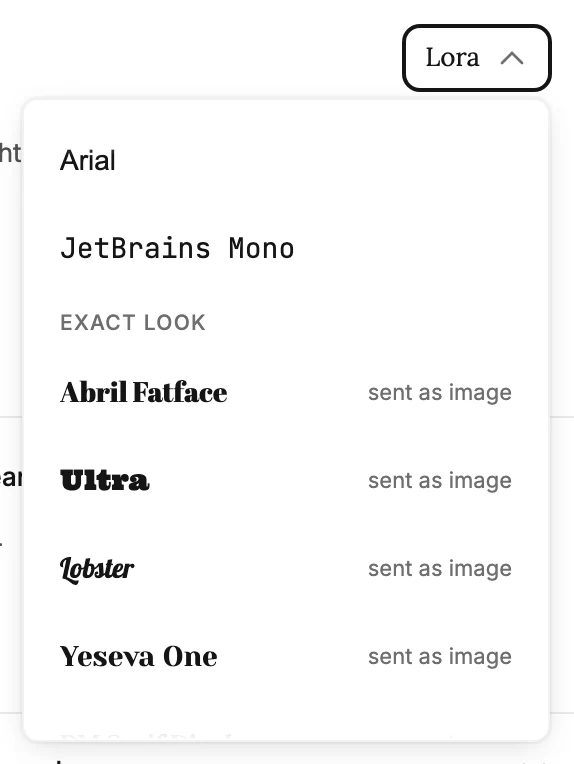
There, each block has a Font list, split in two groups to match.
Email-safe
These fonts travel as live text. Where a mail app has the font, the reader sees it. Where it doesn’t, Jounce names a close match to fall back on, and the words still read, select, and scale.
Every block offers this group. Paragraphs offer only this group. The list says why at the bottom: body text stays selectable, so display fonts aren’t offered there.
Exact look
Headings and signatures offer a second group. Pick one of these and Jounce sends that block as a picture of the words, so every inbox shows the exact letters you see. Each is tagged sent as image in the list. Once you pick one, the panel says Sent as an image so this font stays exact.
A picture can’t change per reader, so a heading that carries a subscriber’s name can’t use one. The list greys the group out and says why. See Personalize with a subscriber’s name.
Signature fonts
On a Signature block the exact-look group is called Signature, comes first, and previews each hand in your own words. See The Signature block.
More in this topic
Updated