

The Text block
Short answer
A Text block is a paragraph on its own. You type the words in the email; its panel sets their weight and color, and your Brand page sets the font.
A Text block is a paragraph on its own: the Text layout, the first card under the tray’s Text tile. This is the Text block in every email you create. For an email that opens in the earlier editor, see the last section.
The words are typed in the email, not in the panel. Select the paragraph and the panel’s heading reads Block. See Edit text in your email.
Type
Weight sets the paragraph Regular or Bold.
Appearance
Color shows Brand until you change it. It offers your brand’s colors and a box for a hex code. Reset to brand goes back.
Elements
Heading adds a heading above the paragraph. See The Title block.
Block link
Block link makes the whole block open one web address. See Link a whole block.
Font, size, and alignment
The font comes from your Brand page, and the layout sets the size and the alignment. See Choose your brand fonts.
Words in other layouts
Words inside most other layouts take the same two rows: Color, plus Weight for body text, prices, and small print. Words set on a picture take neither. In a list, the choice applies to that line in every item, and the panel says so.
Bold, links, and lists
Those live on the toolbar that appears when you select words, not in the panel. See The text formatting toolbar.
In an email that opens in the earlier editor
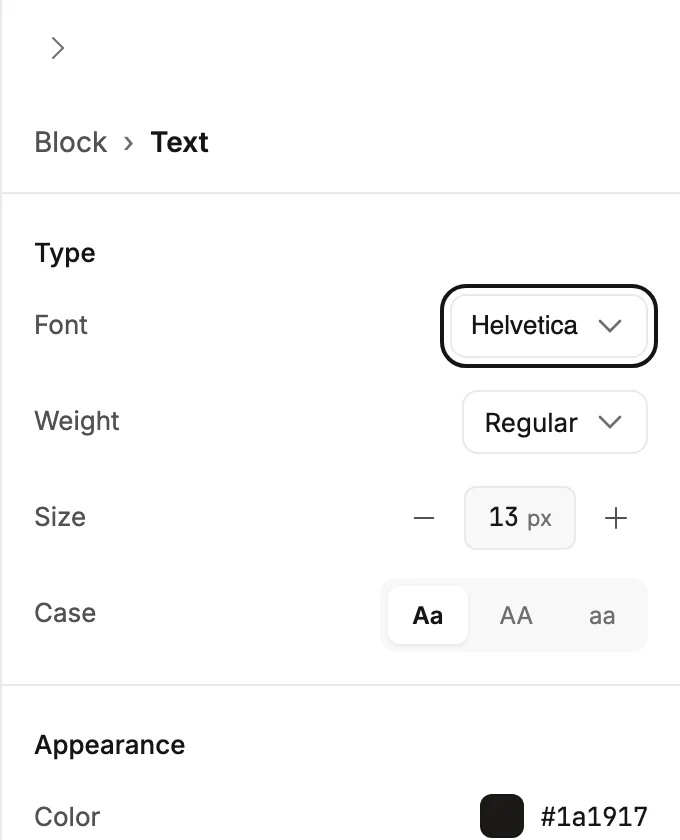
There, the Text tile in the block tray adds a paragraph, and most layouts hold one or more. Point at one and the label reads Edit text. An empty one reads Add your text until you type. Select the paragraph and the panel reads Block › Text.
Type
- Font lists the email-safe fonts. Body text stays real text in every inbox, so the image-based fonts aren’t offered here. The list says so at its foot. See Email-safe and exact-look fonts. A name in a handwriting font is its own block; see The Signature block.
- Weight lists the weights that font offers, from Thin to Black. A font with one weight has no Weight row.
- Size is the type size in pixels. Use the − and + buttons or type a number.
- Case shows the words as typed (Aa), in capitals (AA), or in lowercase (aa). It changes how the words look, not what you typed.
Appearance
- Color opens the color picker for the words. See The color picker.
- Align sets the paragraph left, center, right, or justified.
Advanced
- Letter spacing adds space between letters, in pixels.
A Text block that stands on its own, outside a layout, also carries Background, Block link, and Padding, like any block. See The Block panel.
More in this topic
Updated