

The Email settings panel
Short answer
Select the space around your email and the panel reads Email. It sets how this email sits in the inbox, your own words around the unsubscribe link, and opens your brand kit.
Select the space around your email. Nothing is selected, and the panel’s heading reads Email. This is the Email panel in every email you create. For an email that opens in the earlier editor, see the last section.
Page
Page, under Appearance, sets how this email sits in the inbox. Open runs the email’s background edge to edge. Framed sets the email in a column on a slightly different shade.
The choice is for this email alone. Pick the one your brand kit doesn’t use, and a note under Page names your brand kit’s choice, like This email only. Your brand kit uses Open.
Unsubscribe line
Your own words around the unsubscribe link at the bottom of the email. See Add your own words around the unsubscribe link.
Brand kit
Brand kit opens the Brand page over your email. Your colors, fonts, shape, and logo live there, so the background, the text color, and the corners of every email come from it. Save kit keeps a change, and Back to draft brings you back. See The Brand page.
The subject line and preview text aren’t here. You write them in the send steps, after Continue.
In an email that opens in the earlier editor
There, select the gray area outside your email, and the panel opens with the title Email. Press Esc, or select anything in the email, to close it.
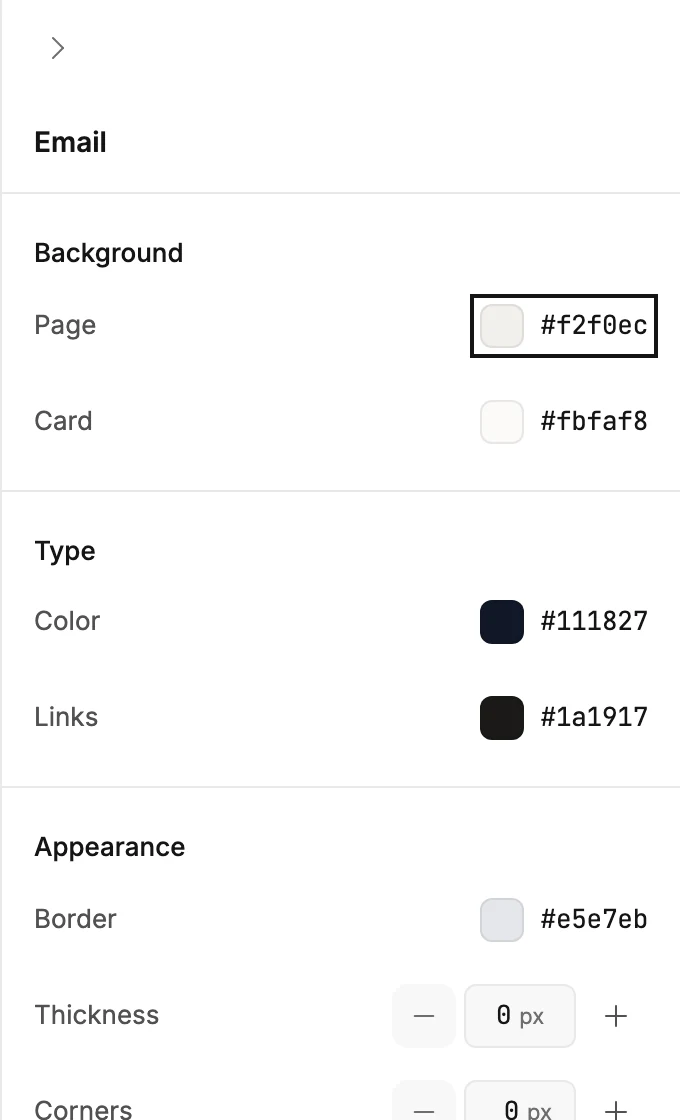
Background
- Page is the color behind everything, the area around your email.
- Card is the color of the email itself, the column your blocks sit on.
Type
- Color is the text color for the whole email. A heading or a paragraph you colored on its own keeps its color.
- Links sets the color of links in your text. An email made before this setting existed has no Links row.
Appearance
- Border draws a line around the card in the color you pick. Thickness sets how heavy the line is. 0 removes it.
- Corners rounds the card’s corners. 0 keeps them square.
Every change shows in the email as you make it, and Jounce saves it as you go. See How the editor saves your work.
More in this topic
Updated