

The Logo block
Short answer
Your logo comes from your Brand page and is the same in every email, in headers and most closing layouts. Select it to replace it or set its size.
In every email you create, your logo is the one saved on your Brand page, and it’s the same in every email. For an email that opens in the earlier editor, see the last section.
There’s no Logo block to add. Your logo sits in a header: the first two cards under the tray’s Headers tile are the logo alone, centered or set on the left. Most closing layouts under Footers carry it too. Select the logo and the panel shows it.
Replace it
Point at the logo in the panel and Replace appears at its top right. It opens your files. You can also drag a picture file onto the logo. The new logo goes to your Brand page and shows in every email. Jounce says Logo saved to your Brand kit, and Undo puts the old one back.
Until you first save your brand kit, a logo you add in the panel stays in that email alone. See Upload your logo.
Size
Size, under Appearance, is S, M, or L. Some layouts offer S and M alone, and one cover names the row Logo size.
Jounce remembers the size you pick: one for logos in headers, one for logos in footers. New emails start at those sizes until you pick another, and emails you’ve already made keep theirs. Save a new logo and Jounce forgets both.
Where it sits and where it goes
The logo has no Link, Align, or Background row. To set it on the left, choose Swap design and pick a logo on the left. In most layouts a tap opens the address in Links to, beside your logo on the Brand page. A block link replaces it.
On your brand color
Every header comes two ways: on the email’s background, or on a band of your brand color. In the block tray, a header card’s Background choice switches between On the canvas and Your brand color.
In an email, choose Swap design and pick the header that ends on your brand color. On the band, the logo is your Brand page’s version for colored backgrounds.
When your brand color is dark (black, navy, forest green) and your logo shows on it, new emails start with the header on the band, and the tray offers it first.
With no logo saved
The panel shows an upload area. A logo you upload there goes to your Brand page and shows in every email. Under it, Without a logo sets what the spot shows until then, in every email. See Send emails without a logo.
- With no choice yet, the spot reads Your logo.
- Brand name shows your brand’s name in the spot.
- Nothing leaves the spot out. On a header that is the logo alone, it also deletes that block. Jounce says Block deleted, and Undo brings it back.
In an email that opens in the earlier editor
There, a Logo block is a small picture shown whole: your logo, never cropped. Most headers and footers in the layout library hold one, and the Logo tile in the block tray adds one on its own. Point at one and a small label reads Edit logo. Empty, it reads Your logo. Select it and the panel reads Block › Logo.
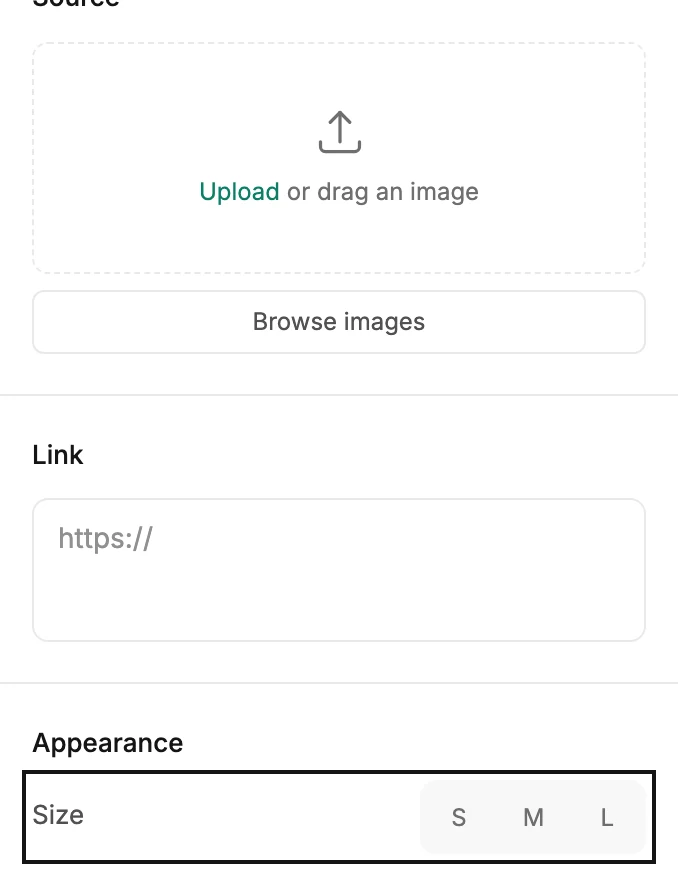
Source
Empty, the row reads Upload or drag an image with a Browse images button. Drop a file on it, or open the picker to upload a logo or reuse one from Your images. See The image picker.
Filled, the row shows the logo with Replace image under it and a × to remove it. A logo always shows whole, with no zoom or shape.
Your brand logo fills an empty spot
An empty Logo block shows the logo saved on your Brand page, in the editor and in the sent email. Put a picture in the block and that picture wins. If your account turned off Apply my brand to older emails, an empty block stays empty and sends nothing. See Apply your brand to new emails.
Link
The box under Link is where a tap on the logo goes, usually your website. Paste a web address, an email address, or a phone number. Once a web address is in, Link actions appears under it. See Link actions.
Appearance and design
- Size is S, M, or L. A logo starts at M.
- Background colors the band behind the logo.
- Align sets the logo left, center, or right.
Accessibility
Alt text is the logo’s description for readers who don’t see it. The hint reads Describe the logo. Left blank, the sent email labels your brand logo with your sender name, and any other logo with Logo.
A Logo block that stands on its own also carries Padding, like any block. See The Block panel.
More in this topic
Updated