

The Button block
Short answer
A button is a link dressed as a box: select it, and the box under Link sets where it goes. Its color, corners, and case come from your Brand page.
A button is the link most readers click. Layouts that ask for a click carry one, and a button on its own is the first card under the tray’s Buttons tile. See Add a button on its own. This is the button in every email you create. For an email that opens in the earlier editor, see the last section.
The button’s words are typed in the email: click the button, then click again and type. The words take no bold, italic, or links of their own. The button is the link. Select a layout’s button and the panel’s heading reads Block › and its name, such as Block › Button. A button on its own reads Block.
Link
The box under Link is where the button goes. Paste a web address, an
email address, or a phone number, then press Enter or click away. Jounce
adds the part that makes it open: https:// for a web address, mailto:
for an email, tel: for a phone number. A short youtu.be link changes to the
full youtube.com address, which opens the same video.
A value that can’t open stays in the box. Jounce says why: That link won’t
open — use a web address, an email, or a phone number. An address that
starts with http:// gets a note that some clicks stop at a browser
warning.
Once a web address is in, Link actions appears under it. See Link actions.
Its look
Buttons take their color, style, corners, and case from Colors and Shape on your Brand page, so every button matches. See The Brand page.
A button on its own also has Appearance, where Alignment sets it on the left or in the center.
A layout’s button that can be hidden has a switch under Elements, in the block’s own settings.
Before you send
A button with words and no address is listed under Before you send. The email can’t be sent until it has one, or until the block has a block link. See What an AI draft leaves to you.
A block link
While the block has a block link, a note stands where the Link box was. It starts Every link in this block opens the block link. A click anywhere in the block then opens the block link. See Link a whole block.
A video layout’s button is the exception once its picture has a link. With no address of its own, the button opens the picture’s link, and a line under the box says so. See Link a video layout to your video.
In an email that opens in the earlier editor
There, the Button tile in the block tray adds one on its own. Point at a button and the editor labels it Edit button. Select it and the panel reads Block › Button. The box under Link works as above.
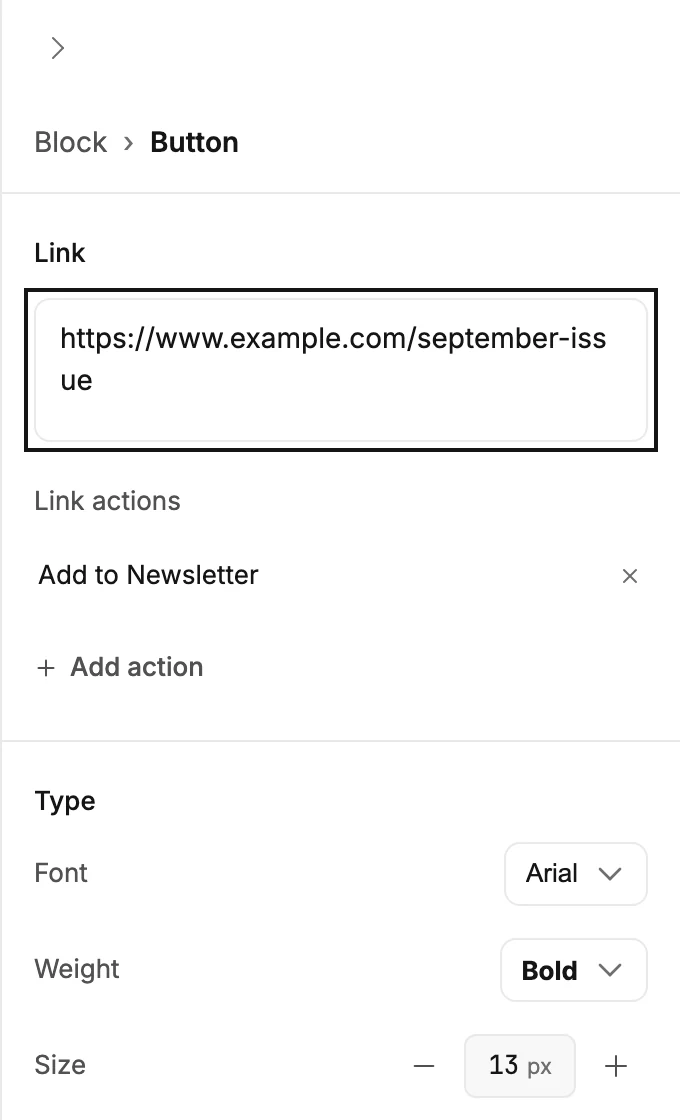
Type
Font lists the email-safe fonts. Weight, Size, and Case work as they do on a paragraph. Button labels often show in capitals; Aa shows them as typed.
Appearance
- Fill colors the box. Text colors the label. Border colors the edge, and Thickness sets how wide that edge is.
- Corners offers four shapes, from square to pill.
Design
Align places the button left, center, or right in its block.
A button that stands on its own, outside a layout, also carries Background and Padding. See The Block panel.
A block link overrides the button there too. When the block that holds the button carries one, a click opens the block link instead.
More in this topic
Updated