

The Link bar block
Short answer
In every email you create, a row of links comes in a layout: a logo row under Headers, or a closing layout under Footers. Type each link’s words in the email, and put its address in the panel.
In every email you create, there’s no Link bar block. A row of short links comes in a layout. For an email that opens in the earlier editor, see the last section.
- With your logo: pick the tray’s Headers tile and choose a logo row that shows links. Two designs do. One sets the links under the logo and holds two to four. The other sets them beside it and holds one or two.
- At the bottom of your email: pick the Footers tile. Two closing layouts there hold a row of links, two to five of them.
For a stacked list of links, pick the Lists tile instead.
Each link
- Click a link, then click again to type its words.
- Select a link and the panel shows the box for its address.
- Links, with − and +, sets how many there are, when the block itself is selected.
There’s no Type, Color, or Align row, and no Block link.
In an email that opens in the earlier editor
There, a Link bar is a row of short text links, the kind that reads Our website or Our shop under a logo. The Linkbar tile in the block tray adds one. Designed headers and footers with a row of links already have one. Point at it and a small label reads Edit links.
The words are text in the email. Select a link and type to change them. An empty link reads Link until you give it words. The words carry no bold or italics; the whole row shares one style.
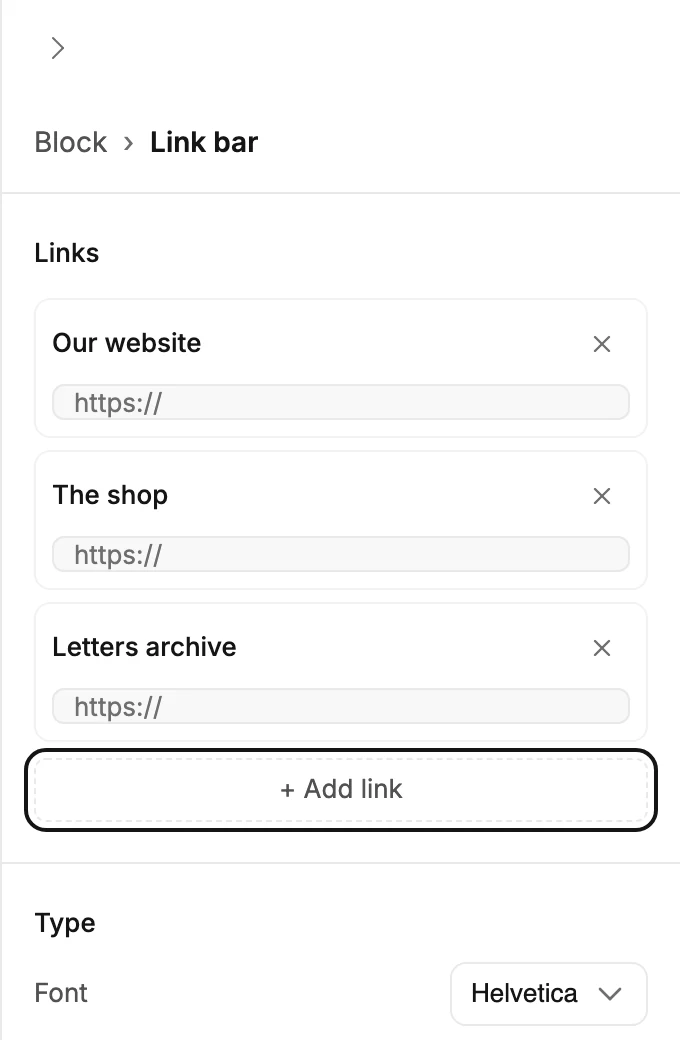
Select the block and the panel reads Block › Link bar.
Links
Links lists every link in the row: its words as you typed them, a box for its address, and a ×. Type or paste the address. A bare address gets https:// added when you leave the box.
+ Add link adds a link at the end of the row with placeholder words and an empty address. Change the words in the email.
Type
- Font and Weight, as on a Text block. See Email-safe and exact-look fonts.
- Size is the text size.
- Case is Aa as typed, AA all capitals, or aa all lowercase.
Appearance
- Color is the text color.
- Align puts the row left, center, or right.
Background and padding
Select Block at the top of the panel for Background and Padding. See The Block panel.
In the sent email
The links go out as plain text links. A whole-block link replaces every link’s own address. See Link a whole block.
More in this topic
Updated