

The Signature block
Short answer
In every email you create, pick the letter signed by hand from the Text tile: Jounce sends its handwritten name as an image. Click the name once to select it, then click it again to type yours; in the earlier editor, add a Signature block instead.
There’s no Signature block in an email you create: a handwritten name comes with the letter that ends in one. The block is only in an email that opens in the earlier editor. See the last section.
The letter signed by hand
Select the + where the letter should go, then pick the Text tile in the tray. Under Letters, select the letter that ends in a handwritten name. See Add a block.
Jounce sends the name as an image, so every inbox shows the same hand. The rest of the letter goes as text.
To type your name, click it once to select it. Then click it again and type.
There’s no Font list, so the hand is the one you see. For a typed name instead, select the whole letter and choose Swap design. Then pick the letter with a typed name. See Swap a layout.
In an email that opens in the earlier editor
A Signature block is a line in a handwriting font, the way a letter ends. The Signature tile in the block tray adds one, and some letter layouts carry one. Point at it and a small label reads Edit signature.
Type your name in the email: click the signature, then click again and type. Select it and the panel reads Block › Signature.
Font
The list opens with the Signature group. Each hand is drawn as the words in your email, with the font’s name under it. You pick by seeing your own name. The Email-safe group follows, for a typed name in a plain font.
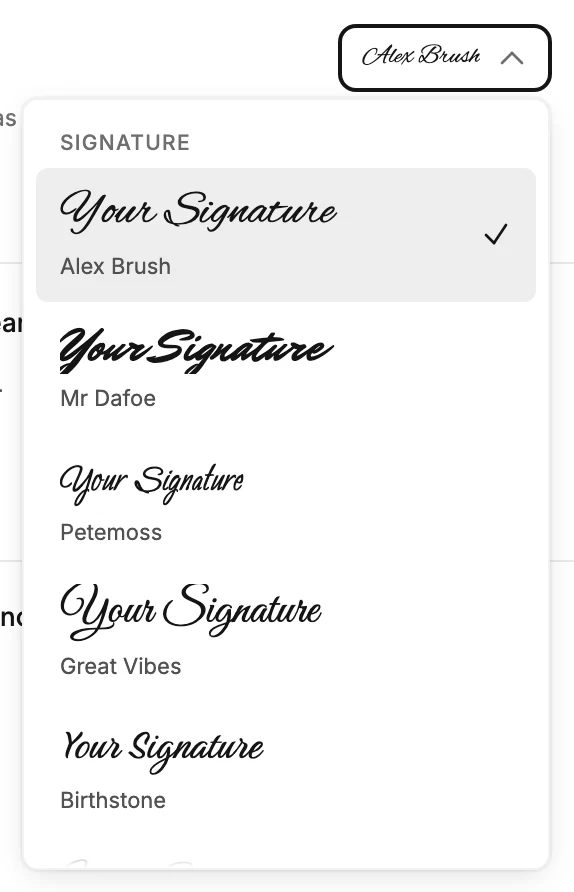
The foot of the list says it plainly. Signature fonts are sent as an image, so every inbox shows exactly what you see here. With a signature font picked, the panel repeats it under the row. An email-safe font goes as text. See Email-safe and exact-look fonts.
The signature fonts come in one weight, so the Weight row appears only with an email-safe font.
Size, color, and alignment
Size sets the type size in pixels. Color and Align work as they do on a paragraph. See The Text block. Under Advanced, Letter spacing spreads the letters.
Note A signature that carries a subscriber’s name can’t use a signature font. The list greys them out and says why: the tag fills in as live text, real words rather than a picture. A signature is your name, so this rarely comes up.
More in this topic
Updated