

The A/B test results
Short answer
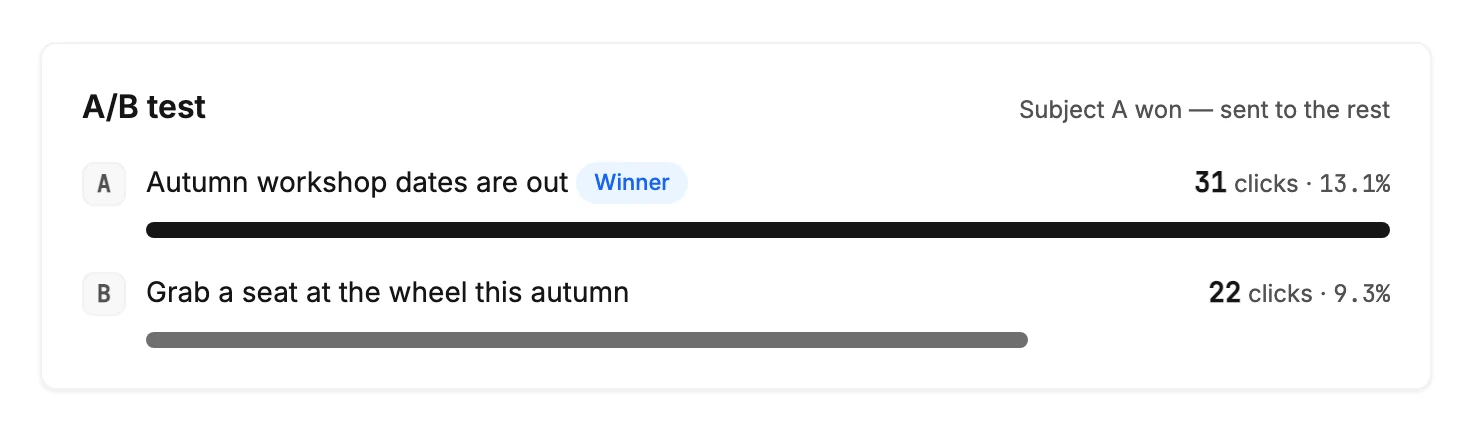
On a tested email’s results page, an A/B test card shows each subject line with its clicks and click rate, over a bar. A Leading badge marks the front-runner during the wait, and Winner marks the one that went to everyone else.
The A/B test card sits under the numbers on a tested email’s results page. It appears once the test group has been sent to, and stays on the page for good.
The two subject lines
Each subject line has its own row: its letter and the subject as the test group saw it. Beside them sit its clicks and click rate, such as 31 clicks · 13.1%. Both are that subject line’s own, worked out from the people who got it.
A bar under each row shows its click rate. The higher rate draws the full width, and the other is drawn to the same scale.
Jounce picks the winner by clicks, not opens. Some mail apps open an email for the reader, to load its pictures early, so opens run high. A click is always a person.
The badge
- Leading sits on the subject line with the higher click rate while no winner has been picked. No badge shows while the two are level.
- Winner marks the subject line Jounce picked to send to everyone else. It stays there.
The status line
The line at the top right of the card says where the test stands.
| It reads | Which means |
|---|---|
| Winner in about 22 hours | The test group has the email and Jounce is waiting for clicks. |
| Choosing the winner | The wait is over and the winner round, the send to the rest of your list, is about to go. |
| Subject A won — sent to the rest | The winner went to everyone who wasn’t in the test group. |
| Subject A won — sending was canceled | You stopped the winner round. Whoever already has the email keeps it, and the rest of your list doesn’t get the winner. |
When the winner round is on hold or can’t finish, the line gives way to the warning box at the top of the page. The box counts who hasn’t gotten the email and says why. See Why does my A/B test say Won’t finish?
A test you stop during the wait shows no line. The status label reads Canceled. Whenever you stop a test, the count at the top of the page says how many got it, such as 400 of 1,000 people. See Cancel a scheduled or sending email.
The head and the numbers
A tested email’s head shows no single subject, because it had two. The numbers above the card count the whole send: the test group and everyone else together. While the test waits, the count at the top reads like 472 of 1,180 people: the test group has it, and the rest wait for the winner. See The results page.
Note While the test runs, the page after you send says the same thing in words. It names how many got each subject, and how many are waiting for the result. The page also says when the subject with more clicks goes to the rest. If they tie, subject A wins.
More in this topic
Updated