

Use a web address with Jounce AI
Short answer
Say what the address is for: the email’s button, or a page for Jounce to read and write from. If your words don’t say, the chat asks which you want before Jounce drafts anything.
When you’re done, your email’s button goes to the address, or Jounce has read the page and written the email from it.
- Type the address in your description on the Start with AI page, or in your message to the chat beside your email.
- In the same message, say what it’s for, with words like the ones below.
- Select Generate email, or press Enter. If your words say what it’s for, Jounce gets to work at once.
| You want | You type |
|---|---|
| Your button to go there | This link is for the button: acme.com/spring, Use this link: acme.com/spring, The call to action is acme.com/spring, Link to acme.com/spring |
| The email written from the page | Read this page: acme.com/spring, Look at acme.com/spring, Write an email about acme.com/spring, Announce acme.com/spring |
Jounce doesn’t read an address you give for the button.
Type a home page in full, such as https://acme.com. Jounce doesn’t take acme.com alone as an address. With two addresses, say what each is for, like Read acme.com/blog and link the button to acme.com/store.
If your words don’t say
Give an address with no reason, like Our spring sale, 40% off through Sunday. acme.com/spring, and the editor opens with a question in the chat. It reads Should I read acme.com/spring and write from it, or link the email’s button to it? The same happens when you select Generate email on Jo’s card and its description holds such an address.
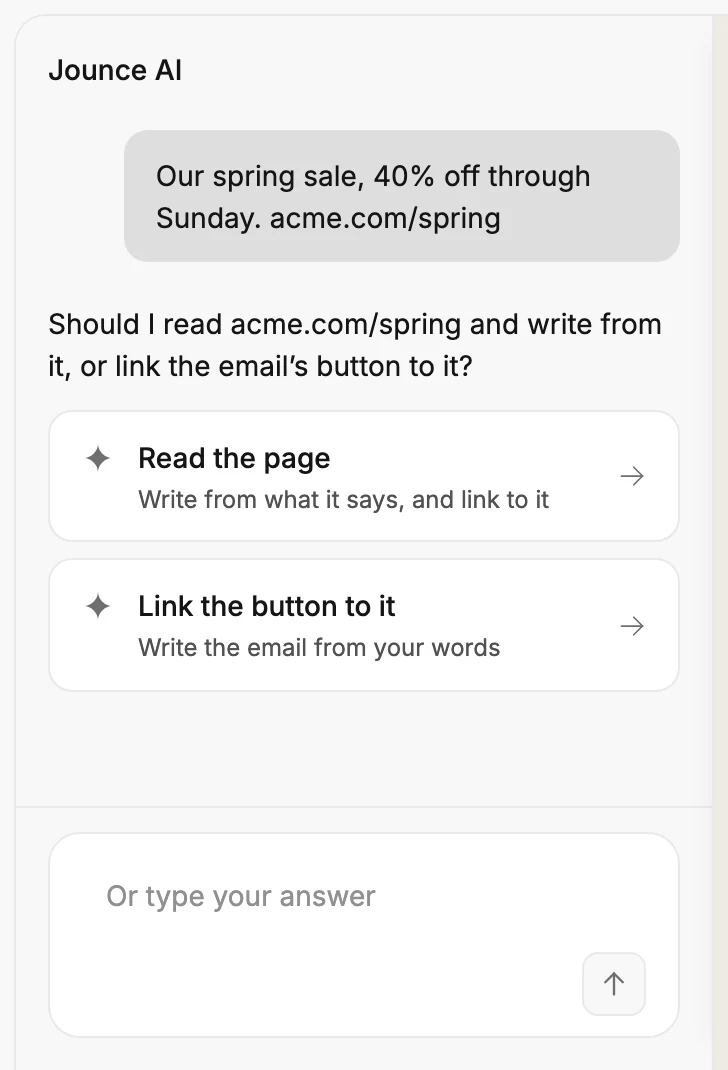
- Read the page has Jounce read it and write the email from what it says. If it’s the only address you typed, your button goes there too.
- Link the button to it sends your button there. Jounce doesn’t read the page, and writes the email from your words.
To answer in your own words, type in the box, such as Link it, and keep it short. What you type goes to the draft too. If your reply answers neither way, Jounce asks again: Which one: read the page, or link the button to it?
Until you answer, Jounce reads nothing and drafts nothing, and nothing counts toward your AI limit. Go to another page or reload, and no draft is made. Your description waits in the box on the Start with AI page.
A window too narrow for the editor, such as a phone’s, can’t show the question, so Jounce doesn’t ask. It leaves the page unread, writes from your words, and leaves the button for you.
A link to a YouTube or Vimeo video gets no question. Jounce reads it, on every plan, and writes an email about the video.
What the draft does with the address
When the draft is whole, the chat opens on it. If Jounce asked, the question and your answer sit under your description.
From a page it read, Jounce takes what the page is about and leaves out its menus, footer and sign-up boxes. Those facts go in the email. Your Brand profile still says who’s sending and how it sounds.
The page’s own photos go in the draft’s photo spots, ahead of any free photo. If the page leads with a YouTube or Vimeo video, the email opens on it instead. A card under Jounce’s reply can then add a video the email left out. See Turn a blog post or a video into an email.
An address for the button goes on every button and link the draft left open. A link inside a list, such as a product’s button or a menu’s link, waits for you. Before you send lists it. See What an AI draft leaves to you.
If you answered Link the button to it, Jounce hasn’t seen the page. The email says only what your words say and won’t describe the page, so a short description makes a short email. Your Brand profile gives only your name and how you sound.
If Jounce can’t read the page
Reading files and web pages is part of Pro, and the first time you share them is on us. After that, if your plan keeps Jounce from reading the page, Jounce drafts nothing and says why above the box. See Start an email with AI.
If Jounce can’t read the page for another reason, the chat’s first reply says why, then This draft is written without it. The email says only what your words say and won’t describe that page. Your draft is saved, so you can add what the page says in the chat.
| Jounce says | What to do |
|---|---|
| acme.com doesn’t let Jounce read it. Paste its words instead. | The site turns Jounce away. Paste the words you want into the chat. |
| acme.com isn’t answering right now. | Ask again later, or paste the words you want into the chat. |
| That’s a PDF. Download it, then add it with the plus. | Save the PDF, then select + in the chat and pick it under Upload from computer. |
| That page has no words to read. | The page holds no text Jounce can read. Paste the words you want into the chat. |
| Jounce can’t open that address. | Check the address for a typo. Jounce opens public web pages only. |
| Jounce couldn’t read that page. | Ask again, or paste the words you want into the chat. |
In the chat beside your email
The same words work in the chat. This button goes to acme.com/spring sets the link, and Jounce doesn’t read the page. Look at acme.com/spring and write an email for it has Jounce read it. If your words don’t say, Jounce asks which you want. Answer in your own words, such as read it or link it.
A YouTube or Vimeo link needs no answer there either: Jounce reads it.
A later message reads a page you shared only when it points at that page, like Read that page, or says yes to Jounce’s question. Look for a better photo reads nothing.
Next step
To change the draft, see Edit your email with Jounce AI.
More in this topic
Also answered here
- why did jounce read my page without asking
- how do I put my link on the button with ai
- why does my ai email say nothing about my page
Updated