

The consent checkbox
Short answer
Turn on Consent under Elements and your form shows a checkbox with words you write. The tick saves as Yes or No on the person’s page, but it doesn’t stop a submission or send a confirmation email.
The checkbox is one of the nine fields a form can ask for. Its switch is Consent, under Elements in the settings panel.
Add it
- Open the list of switches. On a pop-up, press Esc until the settings panel’s heading reads Form. On the other kinds, select the email field.
- Under Elements, turn Consent on. The checkbox appears on the form, in the place its design gives it.
Its words
The words beside the box start as the design’s own, such as Yes — send me the letter. To write yours, select the checkbox on the form, click it again, and type. See Change a field’s label.
A full page that places the sign-up fields twice shows the same words in both places. Change them in one, and the other follows.
What a tick does
The visitor’s answer is saved with them, in two places, when the form adds them to your audience.
Their record keeps it as a custom field. Open Audience, select the person, and among their custom fields Require-signup-confirmation reads Yes or No. The field takes that name whatever words you gave the checkbox. See Custom fields.
To find everyone who ticked it, filter your subscribers by Data field.
Type require-signup-confirmation, choose Is exactly, and type yes.
Has any value finds the people who answered No as well. See
The filter types.
Jounce also keeps the words beside the box, so you can show what the person agreed to. On the same page, under Details, select Consent record. Consent text is your words as they read them, and Consent box reads Ticked or Not ticked.
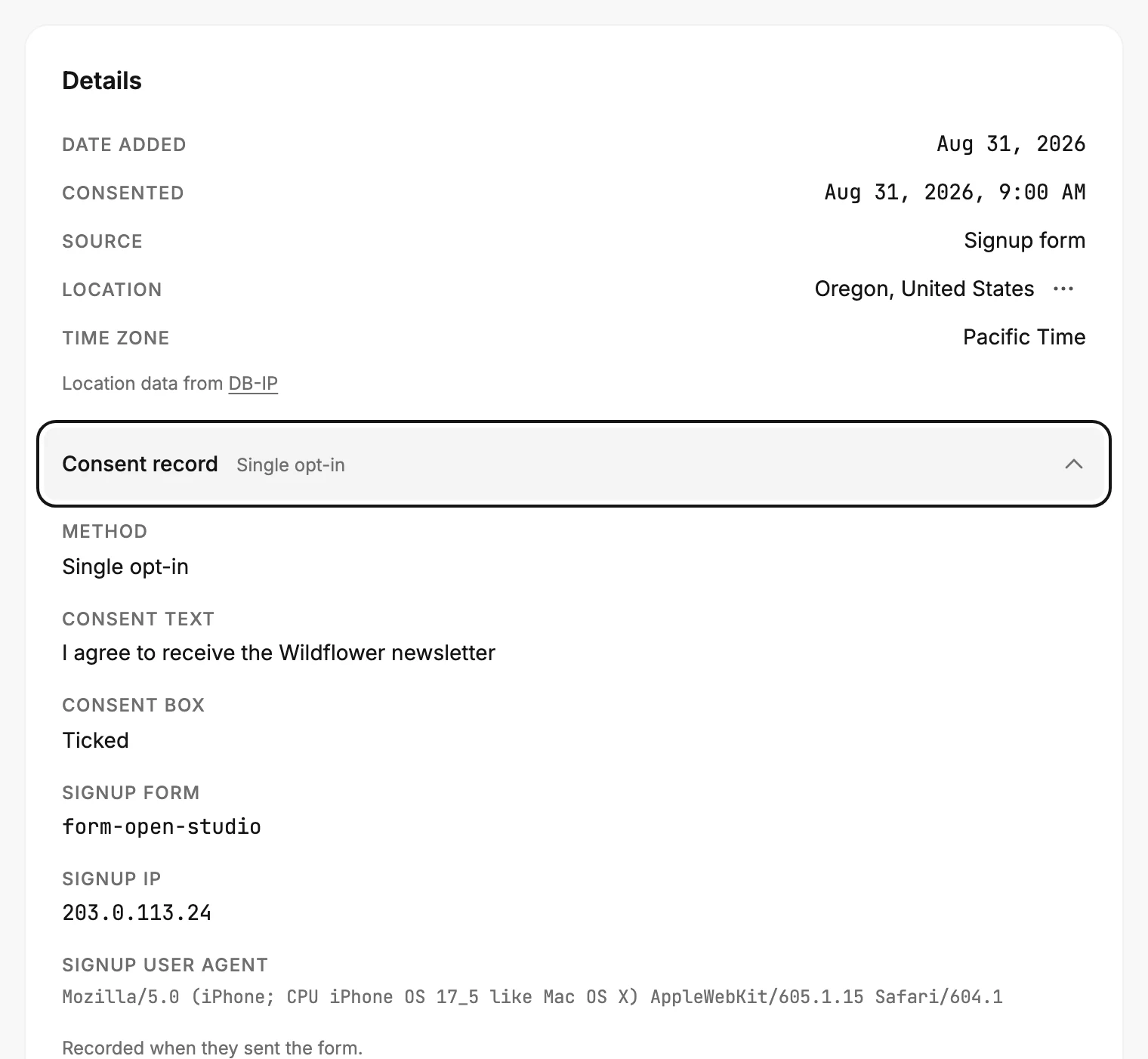
The consent record walks every line of it.
When someone signs up again
Someone already on your list who fills in a form again keeps the answer they had, whether they tick the box this time or not. Both the field and the Consent box line stay as they were. Anyone can type an address into a form, so Jounce can’t be sure a later tick is theirs.
A form never fills in the field for someone who joined without seeing the checkbox, such as from a CSV file or another form.
What it doesn’t do
- It doesn’t hold up the form. There is no Required switch for it, so a visitor who leaves it unticked still submits, with No saved.
- It doesn’t send a confirmation email or change the person’s status. That is the form’s Settings, not a field. See Ask people to confirm their subscription.
More in this topic
Updated