

The consent record
Short answer
The proof that a person agreed to hear from you, kept on their own page. Open Audience, select the person, and under Details select Consent record.
The consent record is the proof that a person agreed to hear from you. It holds what they saw, what they answered, and where the answer came from. It is what you reach for when someone marks your email as spam, or asks what you hold about them.
Open it
Open Audience and select the person. On the right, under Details, select Consent record. The record opens under the row; select it again to close it. It starts closed every time you open the page.
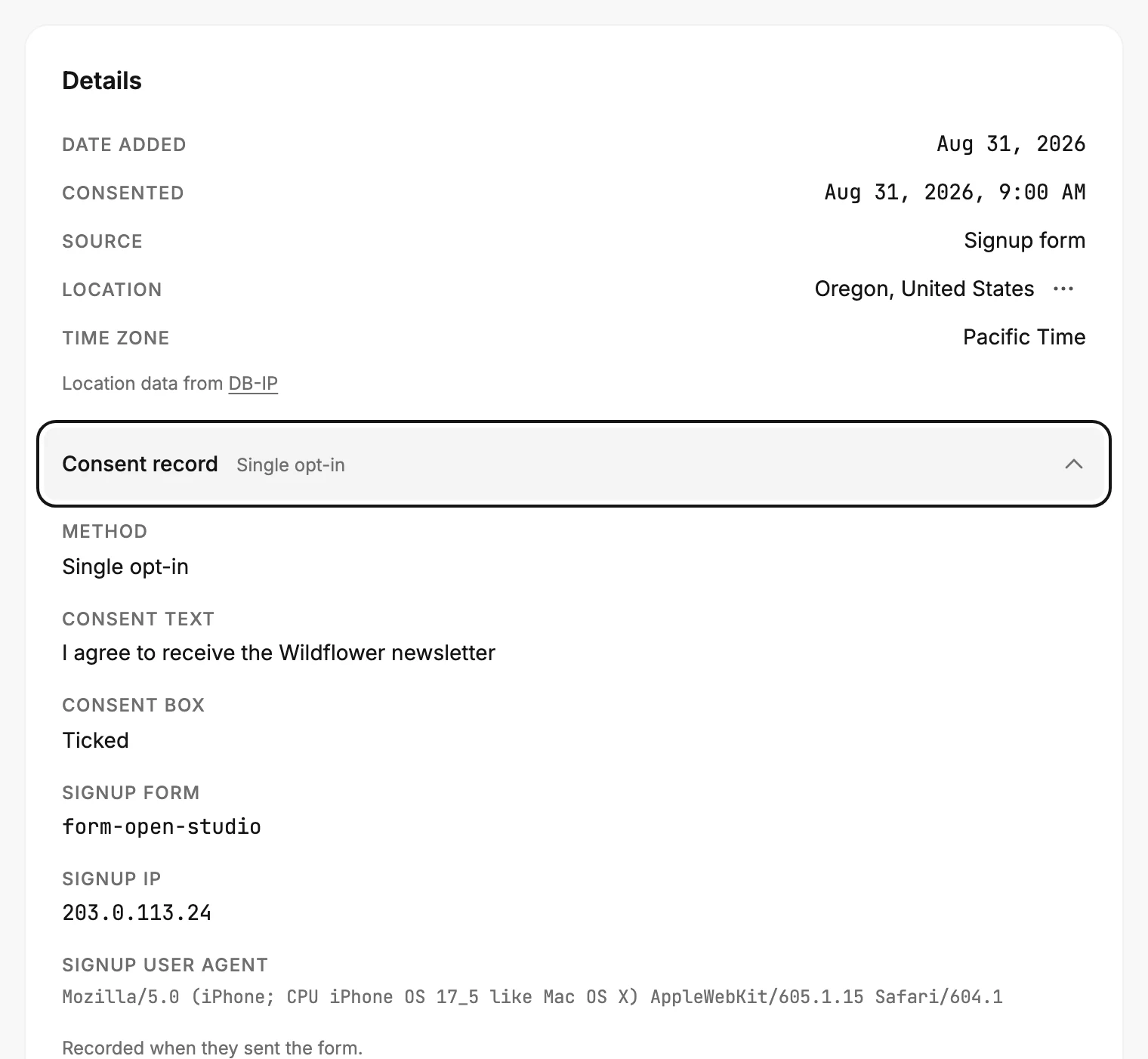
The small text beside the row names the method: Single opt-in or Double opt-in. It’s blank for a record from a file, or from a signup nobody has confirmed. Someone with no record at all has no such row.
The Consented date
Consented, above the record, is the moment the permission counted, to the minute. It shows in your own time zone.
It’s when they sent the form or clicked the link in a confirmation email. For a file you imported, it’s the file’s opt-in date. For someone another tool added, it’s the opt-in time the tool sent, or the moment it added them.
A dash means Jounce has no consent date for that person. That happens for records from before Jounce kept one. It also happens for someone you added by address in a send, because Jounce never saw them agree.
The lines
Each line sits under its own heading, word for word as Jounce stored it.
| Line | What it holds |
|---|---|
| Method | How they agreed: Single opt-in when they sent the form, Double opt-in when they clicked the link in a confirmation email, Single opt-in (API) when another tool added them. |
| Confirmed by | How the confirm arrived: One tap on the email link, or The Confirm subscription button when the page asked them to press it. |
| Consent text | The words beside the form’s checkbox, as the visitor read them. |
| Consent box | Their answer: Ticked, Not ticked, or Not shown when the form had no checkbox. |
| Signup form, Confirmed via form | The id of the form they used. |
| Signup IP, Confirm IP | The internet address Jounce saw at that moment. An older record may list several, split by commas; the last one is the address Jounce saw. |
| Signup user agent, Confirm user agent | The browser’s own description of itself. |
| API key | The key that added them, when another tool did. |
A line Jounce never recorded doesn’t show. An older record can be missing the consent text and the box.
The line at the end
One sentence closes the record and says where the evidence came from.
- Recorded when they sent the form. They ticked the box and sent the form, and that was the whole of it.
- Recorded when they clicked the link in the confirmation email. The click is the proof. The internet address is the one Jounce saw at that click, and the words they read at signup are kept with it.
- Copied from your file when you imported it. Jounce didn’t record it. The lines came out of your spreadsheet, so they are as good as your old tool’s records.
Two kinds of record have no closing line: one added through the developer API, and one waiting on a confirmation.
From a file you imported
Every column you set to Keep as proof becomes a line. Each heading is your file’s own, word for word: Optin IP, Confirm IP, Confirm time. See Keep your opt-in proof when you import.
Before someone confirms
Someone who filled in a form with opt-in on stays Unconfirmed until they click the link. Their record holds Consent text and Consent box and stops there. Nothing claims their permission yet. So there’s no method and no closing line, and Consented shows a dash. Their click fills in the rest.
If someone you deleted signs up again this way, they keep their old record and Consented date until they click. See How double opt-in works.
What it isn’t
- It isn’t a location. The internet address is what Jounce saw at that one moment, and opens and clicks never change it. Jounce’s estimate of where they are sits above, in the Location row. See Where a subscriber’s location comes from.
- It isn’t yours to edit. Jounce writes it when it happens. If the person confirms again later, that click is written into the same record. Method, Confirmed by, Confirm IP, Confirm user agent and Confirmed via form take the new click’s values. The lines their first signup recorded stay, such as Signup IP. Nothing else in the app changes it.
- It isn’t all in your export. Subscribers.csv has the consent date and the method. The rest of the record stays here. See Export subscribers.
Erasing a person’s data deletes the consent record along with the rest. See Erase a subscriber’s personal data.
More in this topic
Updated