

Swap your form’s design
Short answer
On a full page, select a block and choose Swap design to give it another design. A pop-up, an inline form and a link-in-bio page keep the design they were made with.
When you’re done, a block of your full page wears a different design.
-
On a full page, select the block you want to change. Select a part of it and press Esc, so the whole block is selected.
-
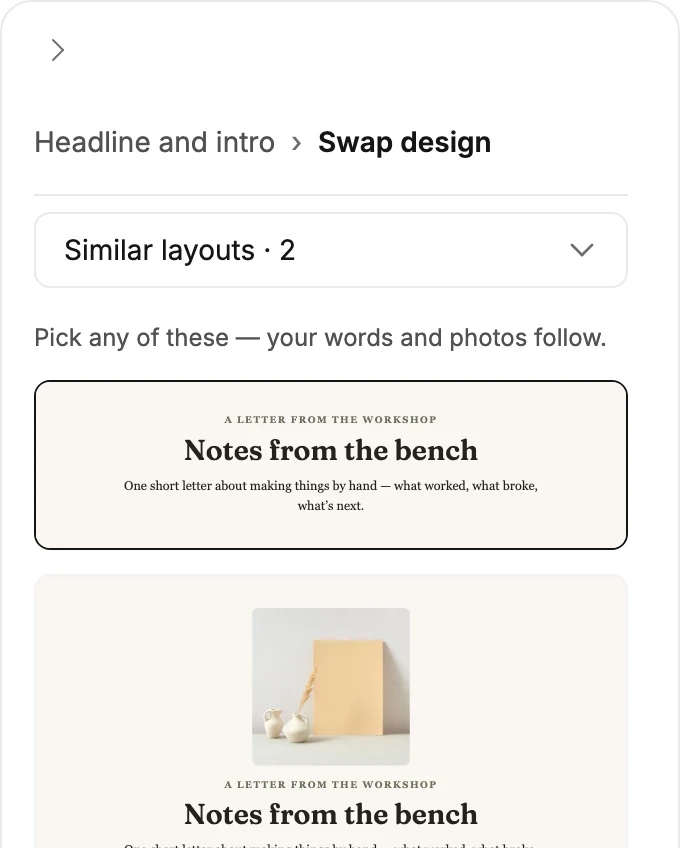
Select Swap design, beside Block in the settings panel. The panel shows a gallery, with the block’s own design outlined.
-
Pick a card. The block changes at once, and the gallery stays open so you can try another.
-
Select Block at the top of the panel, or press Esc, to go back to its settings.
Each pick is one step for Undo in the top bar. Swap design shows only when the block has another design to take.
What happens to your words
The gallery opens on Similar layouts, the designs that do the same job. There it says Pick any of these — your words and photos follow. Each of those cards shows your own words and photos, just as the block would look.
Switch back to a similar design you tried earlier, and what you’ve typed since stays. That design’s earlier version only fills a part the other one had no room for.
The menu above the cards holds the other groups. On those, the gallery says that only similar layouts keep your words and photos. A design from another group starts with its own words. Swap back, and your words return.
A block with no similar design opens on a wider group instead, under a line that starts No similar layouts yet.
A pop-up, an inline form, a link-in-bio page
These come as one piece, so they have no Swap design. Their colors and fonts follow your brand kit; Brand kit in the settings panel opens it.
For a different design, start another form from the template you want. See Create a form from a template.
Next step
Make the new design’s words yours in Edit the words, images, and buttons.
More in this topic
Updated