

The trigger
Short answer
The trigger is the top card in every automation, and it picks who gets in. It offers two starts: Someone subscribes to a form, or Subscriber is added to a segment.
The trigger is the card at the top of the canvas, the area your steps sit on. Each automation has just one, and you can’t delete it. Select it and the panel reads Trigger, with one heading: Begin when.
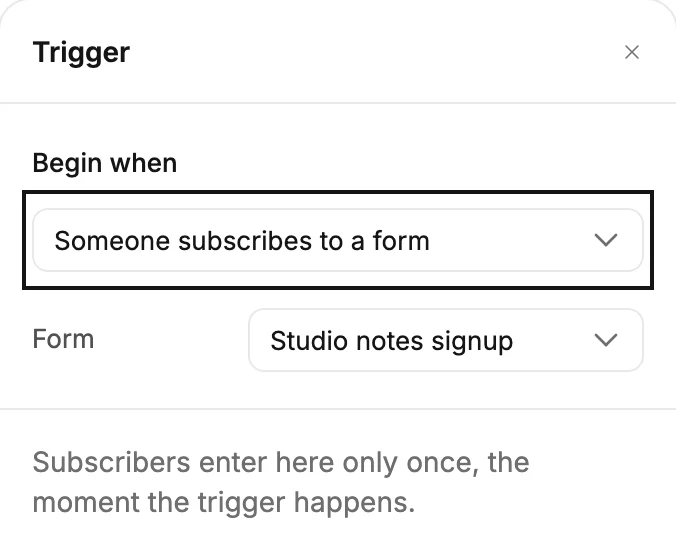
Someone subscribes to a form
A Form row appears. Choose one of your forms; type to search when the list is long. Jounce starts the automation the moment someone subscribes through that form. If the form asks people to confirm their subscription, that moment is when they confirm. See Ask people to confirm their subscription.
Someone already on your list who fills in the form doesn’t enter.
If you have no forms, the row says You don’t have any forms yet — create one under Forms first.
Subscriber is added to a segment
A Segment row appears. Choose a segment, a saved group of subscribers. Jounce starts the automation the moment someone is added to that segment. That happens when:
- you add them to the segment on their page or from the list
- someone fills in a form that sends people to that segment, whether they’re new or already on your list
- a CSV import puts them in it
- an Action step in another automation adds them
If the form sends people to that segment and they have to confirm their subscription, they enter when they confirm.
After you import a long list, people can enter a little later, up to about an hour. Jounce gives itself time to check the addresses it couldn’t check during the import. See How subscribers move through an automation.
A new signup also enters an automation that starts with Someone subscribes to a form on that same form. If the two send the same emails, pause the one that starts with the form, because the segment one also reaches people already on your list. See Pause an automation.
Saving a filter as a segment doesn’t count. The people it gathers don’t enter. See Save a filter as a segment.
If you have no segments, the row says You don’t have any segments yet — create one under Audience first.
Who enters
The note under the rows says it: Subscribers enter here only once, the moment the trigger happens. Only people with the Subscribed status enter. Jounce skips anyone who is Unconfirmed, Unsubscribed, Bounced, or Complained, even when the trigger happens for them. See Subscriber statuses.
Once someone is in, they can’t enter the same automation again. Filling in the form twice changes nothing. Neither does leaving the segment and joining it again.
Switching triggers
Pick the other option under Begin when, and the form or segment you chose is cleared. Choose again. Until you do, Launch waits, and the card shows a red line: Choose a form for the trigger or Choose a segment for the trigger.
The card
The card’s first line reads When someone subscribes to a form or When a subscriber is added to a segment. The form or segment’s name sits beneath. Before you choose, the second line reads Choose a form or Choose a segment. If you started from scratch, the card is a dashed Add trigger button until you pick.
More in this topic
Updated