

How subscribers move through an automation
Short answer
Someone enters the moment the trigger happens, walks the steps one by one on their own clock, and leaves at the end. The number on a card counts the people at that step right now.
An automation is a path, and each subscriber walks it alone. Two people who entered a day apart are a day apart at every step.
Entering
Someone enters the moment the trigger happens for them. Each person enters an automation only once. Only people with the Subscribed status enter. See The trigger.
Each automation is its own path. A person can be inside several at the same time, and each one counts them on its own.
Moving
Jounce takes each person down the canvas one card at a time. A Send email step sends and moves them on. A Time delay holds them until the wait ends.
A Condition checks them, or waits for the open or click, and sends them down Yes or No. A Percentage split sorts them into a branch. An Action adds them to a segment or removes them from one, then moves them on. See How steps connect.
The numbers you see
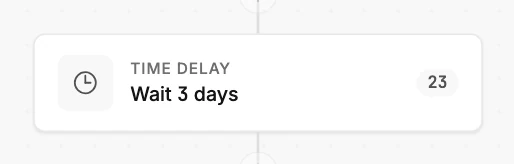
While the automation is live, a card shows a small number at its right edge. It counts the people standing at that step at this moment. Most of them are waiting at a Time delay or a Condition. A card with nobody at it shows no number.
The Automations page adds them up. The card’s in it now line and the list’s In it now column count everyone inside, at any step. See The Automations page.
These are counts. Jounce doesn’t list who is inside. A subscriber’s page doesn’t say which automations they’re in either.
Before each email
Jounce looks at the person again before every Send email step. If someone unsubscribed, bounced, complained, or was removed since they entered, they don’t get that email. The same goes for an address on your suppression list or on Jounce’s list of addresses it can’t send to, someone not yet confirmed, or an address whose domain can’t receive mail.
Jounce skips the email and moves them on to the next step. Skipping an email doesn’t stop them or take them out of the automation. If an email you expected hasn’t gone out, see Why hasn’t the next email gone out?
A new subscriber’s email can wait
When someone joins as Subscribed straight away, Jounce checks that the domain in their address can receive mail. An email that comes due before the check is done waits at its Send email step. They’re inside the automation the whole time, and that card’s number counts them.
- If Jounce already knows the domain receives mail, as with Gmail or Outlook, the email doesn’t wait.
- Otherwise the check usually takes about two minutes.
- If the domain looks like it can’t receive mail, Jounce takes up to about two hours to be sure. If it really can’t, Jounce skips the email.
- If the check can’t finish, the email goes out about three hours after they joined.
After you import a long list, people can enter a little later. If Jounce couldn’t check every address during the import, it gives itself time to check the rest first. That’s a few minutes, or up to about an hour for a very large list. No card counts them until they enter.
Someone who confirms through your confirmation email isn’t checked this way. Once a person’s check is done, their emails don’t wait for it again.
Leaving
A person finishes when they pass the last card on their path. If the path ends in an Exit automation step, they leave there instead. The insights page shows those people in a note as having left, not under Finished.
Finished or left, a person no longer counts as in the automation. The same automation never takes them in again. See Automation statuses.
While people are inside
You can change the steps while people are inside. The people already in it finish the path they started on. But a changed email reaches everyone the step hasn’t sent to yet. See Editing a live automation.
More in this topic
Updated