

Branch on whether someone opened or clicked
Short answer
Add a Condition below a Send email step and pick Open the email or Click a link in the email. Set the Timeframe, then build the Yes and No branches.
When you’re done, people who opened or clicked go down one branch. Everyone else goes down the other.
-
Select the + below the Send email card. In the Add a step menu, choose Condition.
-
In the Condition panel, under Move to “Yes” if subscribers…, pick Open the email or Click a link in the email.
-
Pick a Timeframe. Seven days gives most people time to read. Within a custom amount of time adds a Within row for your own number.
-
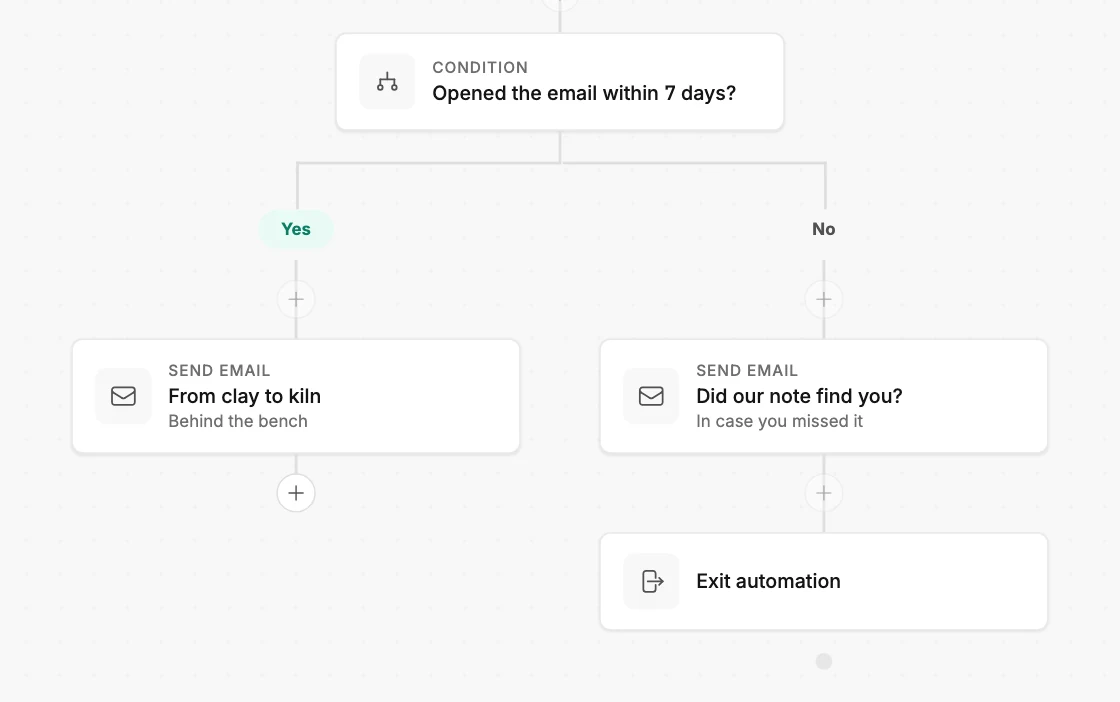
Close the panel. Two branches hang below the card, labeled Yes and No.
-
Select the + under Yes and add what happens for people who did. Select the + under No for everyone else.
A step that already sat below the email is on the Yes side. If both branches should get it, add it again under No.
Clicks are decided the moment they happen. Opens are decided only once the time is up, so nobody moves down Yes early. See The Condition step.
Next step
Each branch needs its own email: Create a new email for a step. Where a branch ends is in How steps connect.
More in this topic
Updated