

The Condition step
Short answer
A Condition sends each subscriber down Yes or No. It asks if they opened the email above it, clicked a link in it, or match filters on arrival.
A Condition asks one question about each subscriber and sends them down Yes or No. Select the card and the panel reads Condition. The row Move to “Yes” if subscribers… offers three questions.
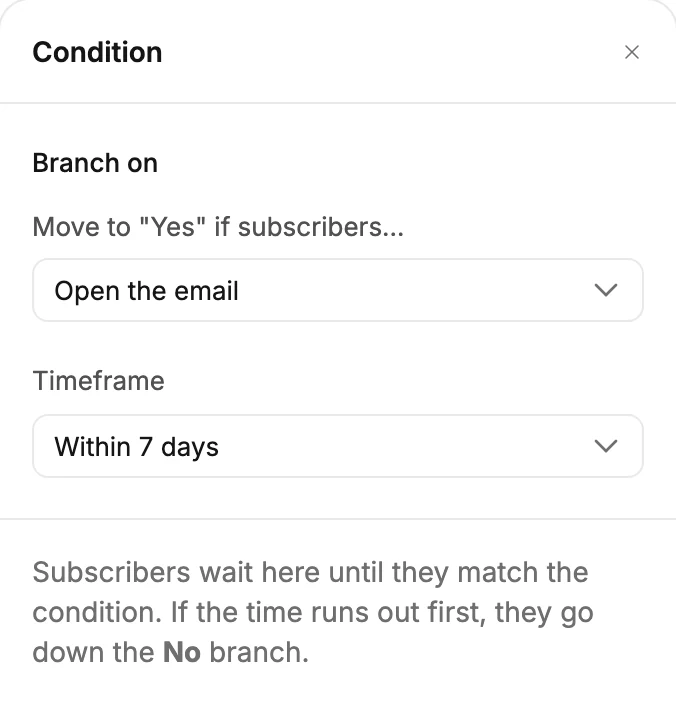
Open the email · Click a link in the email
Both watch the closest Send email step above the Condition. Timeframe is how long to watch: Within 1 day, Within 7 days, Within 30 days, or Within a custom amount of time. The custom choice adds a Within row with a number and a unit: minutes, hours, days, or weeks.
A Condition you’ve just added starts at Open the email, within one day.
The note under the rows says how the wait works. Subscribers wait here until they match the condition. If the time runs out first, they go down the No branch. The two questions decide differently:
- Click a link in the email: the first click sends them down Yes at once. No click by the end of the time means No.
- Open the email: Jounce waits until the time is up, then checks. An open in that time means Yes; otherwise No. Nobody goes down Yes early, because some mail apps open pictures before a person does. See How Jounce counts opens, clicks, and bounces.
A Condition with no Send email step above it has nothing to watch. Everyone goes down No when the time runs out.
Meet certain filter conditions
Choose filters opens the filter builder, the same one the Audience page uses. See The filter builder.
Apply a filter and the row reads 2 filters, with Edit and Clear beside it. The note says the rest. Jounce checks each subscriber the moment they arrive. Anyone who matches the filters goes down the Yes branch — everyone else goes down No. Nobody waits here.
The card
The card reads the question:
- Opened the email within 7 days?
- Clicked a link within 7 days?
- Matches 2 filters?
Until you choose filters, the card reads Choose the filters. The two branches hang below with Yes and No labels; add steps to each. Branches never join back. See How steps connect.
Before you launch
A Condition that isn’t set shows a red line and holds Launch. The line reads Set the condition time window or Add at least one filter for the condition.
If a segment in its filters is deleted
A Segments filter can name a segment that was deleted after you chose it. Jounce can’t check people against a deleted segment. So it stops each person who reaches the Condition, and you can’t resume them. The card’s red line reads Replace the deleted segment in this condition. Launch and Relaunch won’t work until you do.
- Select the card, then Edit beside the filters. The filter builder opens.
- In the Segments row, the deleted segment’s label is red and reads Deleted segment, with Remove the deleted segment before you apply under it. The count says Fix the marked filter to see who matches, and Apply stays off while the label is there.
- Select the × on that label. Pick a segment that still exists, or remove the row with the × at its end.
- Select Apply. The red line clears.
People already inside keep the steps they started with, so some may still stop at the old Condition. See Why did subscribers stop partway?
More in this topic
Updated