

The insights page
Short answer
One automation’s results: its name and status, then six cards for entered, in it now, finished, emails sent, open rate, and click rate. A line for bounces, complaints, and unsubscribes, any notes, a table of every email step, and two breakdowns follow.
The page opens over the app with one link at the top left, Back to automations, and everything else in one column. Esc leaves too. There is no date range to pick: an automation’s numbers cover its whole life.
The head
The automation’s name comes first. Under it sit its status label and the date it was created. The label is the same one the Automations page shows. See Automation statuses.
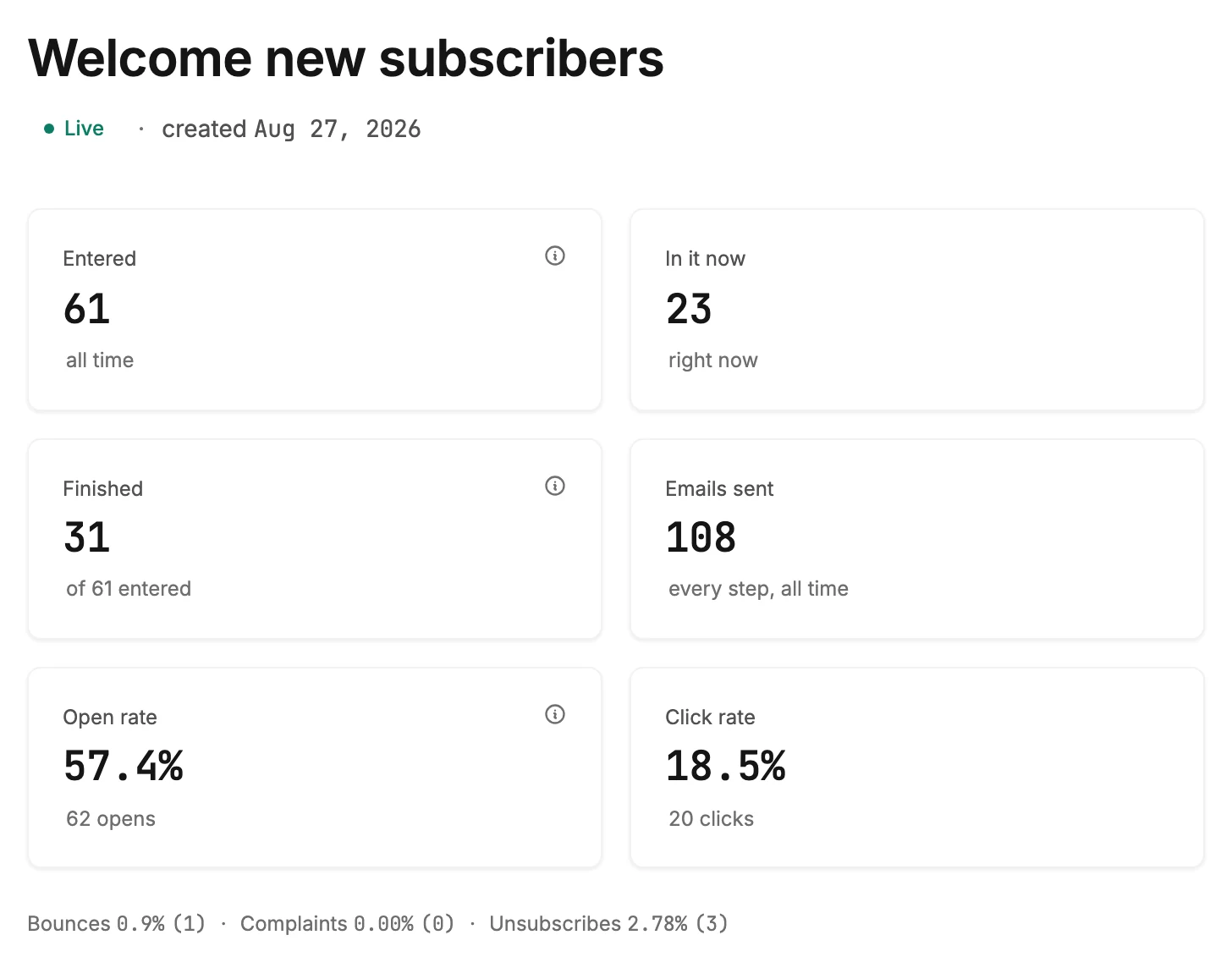
The six cards
The first three tell the story of the people. The last three tell the story of the emails. Each card shows a number with a short line under it. An ⓘ beside a label carries a short explanation. Rest your pointer on it, or move to it with the keyboard. On a phone, tap it.
| Card | What it shows |
|---|---|
| Entered | Everyone who has ever entered, marked all time. Its note reads Each subscriber goes through an automation once. |
| In it now | The people inside at this moment, marked right now. |
| Finished | The people who reached the end, as of 61 entered. Its note reads Reached the last step. Everyone else is still inside, stopped partway, or left along the way. |
| Emails sent | Every email the automation has sent, across every step, marked every step, all time. |
| Open rate | The share of sent emails that were opened, with the count of opens under it. Its note reads Includes auto-opens from some mail apps, so treat this as a guide. |
| Click rate | The share of sent emails with a click on any link, with the count of clicks under it. |
For how each one is worked out, see How Jounce counts an automation’s numbers. When Finished trails Entered, see Why doesn’t Finished match Entered?
Every automation together, over a time range you pick, is on the Analytics page, walked through in See how your automations did over a period. When the two pages disagree, see Why doesn’t the Automations tab match an automation’s insights?
The line under the cards
One line reads Bounces, Complaints, and Unsubscribes, each as a rate with its count in brackets. When bounces or spam complaints run high, that part of the line turns amber and a note appears below.
A small number of sends never turns Bounces amber. Complaints can turn amber at any number of sends. It takes more than one complaint and a rate of 0.1% or more, so one complaint on its own never does it.
The notes
Short lines under that, shown only when there is something to say.

- Jounce started counting sends after some of this mail went out, so totals and rates aren’t shown yet. The automation sent before Jounce counted its sends, so those cards show dashes. See Why do my automation’s numbers show a dash?
- 3 people stopped partway — a step couldn’t run. Nothing moves them on its own. Open the automation. A strip at the top of its steps says what happened and offers to resume them. See Resume stopped subscribers.
- Spam complaints can hurt every email you send. Check who this automation reaches. In amber, when spam complaints run high.
- Many of these addresses are dead, so Jounce now skips them. Check where this audience came from. In amber, when bounces run high.
- 1 person left because Jounce closed their run. That happens during a resume, or after their email address changed. Nobody designed this ending. It comes from resuming stopped subscribers who turned out to be unreachable, or from changing someone’s email address.
- 1 person left at an Exit automation step. Whether that’s good news depends on where you put the step. Where you put the step decides what the number means, so Jounce won’t call it good or bad. See Why doesn’t Finished match Entered?
- 2 left before finishing. An Exit automation step sent them out, or Jounce closed their run. The older single line, shown only when Jounce couldn’t split the two on that read.
- Bounce and complaint tracking started on a date, Earlier sends aren’t measured for those. The two rates on the line cover the sends after that date.
Performance by step
A table with one row per email step, in the order people meet them. Each row shows the email’s subject, how many were sent, and its open, click, and unsubscribe rates. See The Performance by step table.
The breakdowns
Opens by mail app and Clicks by device follow, when the automation has them. They work the same way as on an email’s results page. See Opens by mail app and clicks by device.
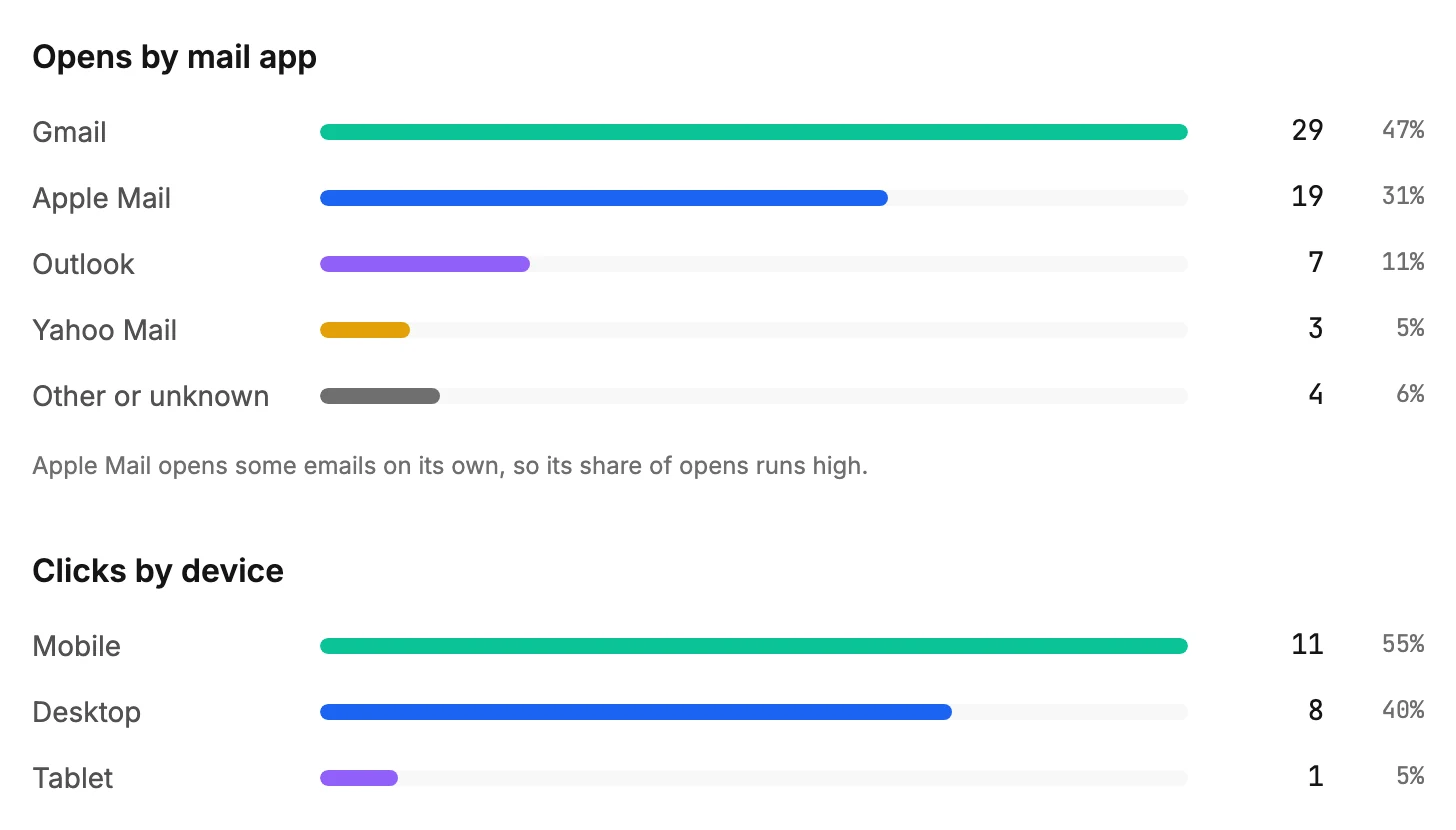
One difference: an automation’s opens go back to its launch, and Jounce started placing opens in a mail app later. When some opens came before that, a line under the list says how many opens it covers, as Based on 58 of 90 opens. It also gives the date the tracking started.
When there is nothing to show
A draft, a live automation nobody has entered, or a deleted one shows one short message in place of all this. See Why can’t I see insights for an automation?
More in this topic
Updated