

The Performance by step table
Short answer
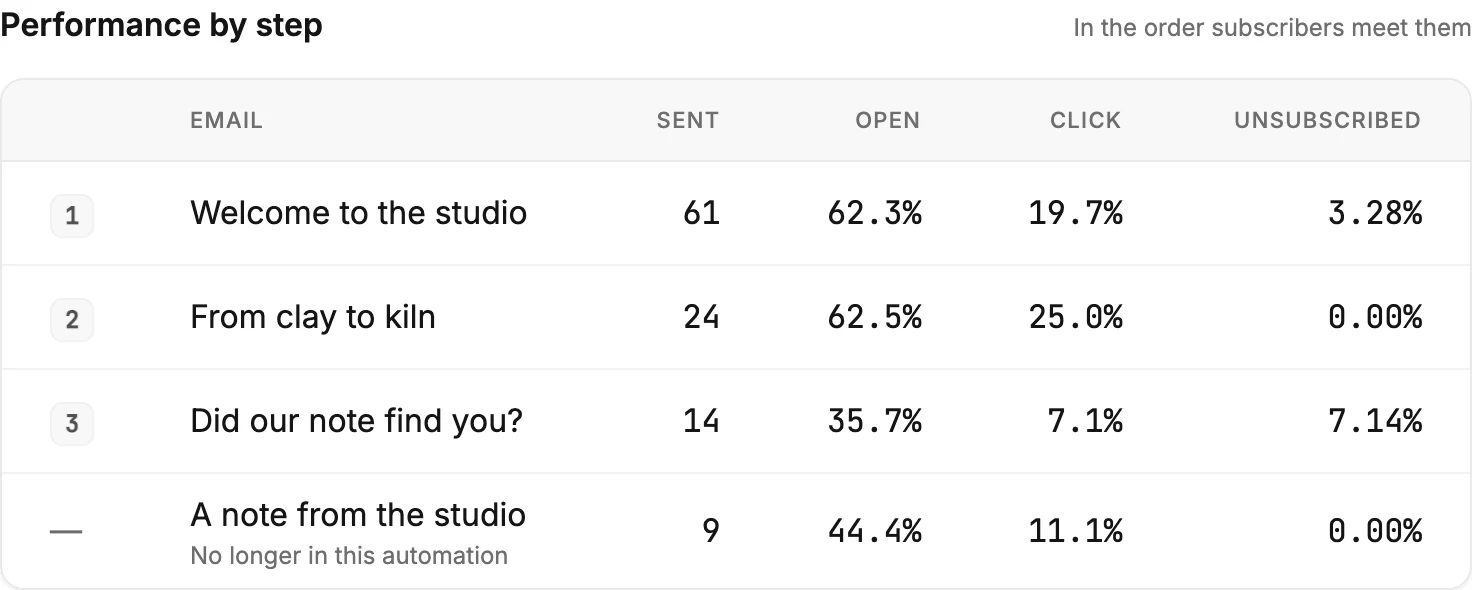
One row per email step, in the order people meet them, with the subject, the number sent, and the open, click, and unsubscribe rates. A step you removed keeps its row, marked No longer in this automation.
The table sits under the notes on an automation’s insights page. Its note reads In the order subscribers meet them. The first row is the first email people get, and the rest follow it down the path.
The columns
| Column | What it shows |
|---|---|
| The number | The step’s place in the path. A dash marks a step no longer in it. |
| The subject line the step sent. A step with no subject reads Untitled email. | |
| Sent | How many emails that step has sent, all time. |
| Open | The share of that step’s sent emails that were opened. |
| Click | The share with a click on any link. |
| Unsubscribed | The share of people who unsubscribed from that email. Rest your pointer on it to see the count. |
Each rate is a share of that row’s Sent. So the rows compare fairly, even when a later step has reached fewer people. See How Jounce counts an automation’s numbers.
A step that hasn’t sent yet
A step nobody has reached shows 0 under Sent and a dash for each rate. There is nothing to divide yet. The row fills in as people reach it.
A step you removed
When you take a Send email step out of a live automation, its emails were still sent. Its row stays, listed after the steps still in the path. It reads No longer in this automation under its subject, with a dash where its number was. Its sends, opens, and clicks stay in the cards above.
Tidying the path never shrinks the totals. See Editing a live automation.
No email steps
An automation with people inside but no Send email step shows No email steps in this automation yet instead of the table.
More in this topic
Updated