

Resume stopped subscribers
Short answer
Fix the email that couldn’t go out, then select Resume subscribers on the yellow strip. Jounce shows who can pick up, and they carry on from the step they stopped at.
When you’re done, the people who stopped carry on from the step where they stopped. Jounce spreads a large group over hours, to help your mail reach the inbox.
- Open the automation. A yellow strip under the top bar counts the people who stopped: 3 subscribers stopped partway — a step couldn’t run. This didn’t affect anyone else.
- Fix the cause first, or they stop again at the same step. See Why did subscribers stop partway?
- Select Resume subscribers at the strip’s right. Jounce checks who can pick up, and a window opens.
- Read the window. Its title shows the count, such as Resume 2 stopped subscribers? The line under it says they’ll pick up at the step where they stopped.
- Select Resume 2 subscribers, or Leave them stopped to close the window and change nothing.

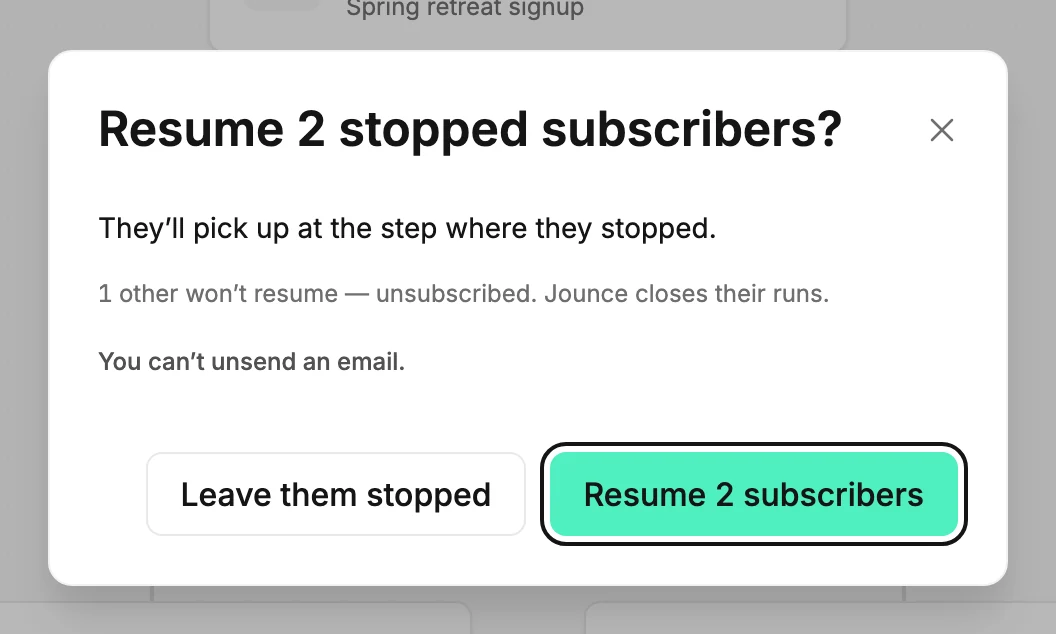
What the window tells you
- Who won’t resume, and why. A line counts them. Some aren’t Subscribed. They unsubscribed, bounced, marked an email as spam, haven’t confirmed, or were deleted. The line calls all of these not subscribed. Others have been inactive over 180 days, or have an address Jounce can’t reach. Jounce takes them out of the automation instead of resuming them.
- Who can’t restart at all. The step they stopped at is often a Condition that checks a deleted segment, or a Send email step whose email was deleted. The line reads 1 can’t restart at all — resuming would only stop them again, and they stay stopped.
- When there are many, the line adds how many hours Jounce spreads them over, to help your mail reach the inbox.
- You can’t unsend an email. Nobody gets an email they already got. Nothing before the stopped step runs again.
When nobody can pick up, the window is titled Nobody can resume. It says why, such as They’re stopped at a step that can’t run. When a card is marked, it adds Fix the marked step so new subscribers don’t stop there too. Close is its one button.
What to expect
The strip changes to Resuming stopped subscribers — 0 of 2 done. Jounce paces these over a few hours; you can leave this page. When it finishes, a message says Resumed 2 subscribers — they picked up where they stopped. The strip goes away. If some couldn’t restart, or stopped again at the same step, the message says how many and why.
If the resume stops before it finishes, the message reads Resumed 1 of 2, then the resume broke off. The rest are still stopped — it’s safe to try again.
On a paused automation
The strip and its button show on a paused automation too. Resuming works only on a Live automation, so relaunch first. Otherwise the window’s button answers This automation isn’t live — nothing was resumed. Launch it first.
When the button isn’t there
- Admins and Managers see Resume subscribers. An Editor sees the strip’s sentence and no button. See Workspace roles.
- While a resume is running, the strip shows its progress instead.
- While a marked card still names a problem in its email, the strip ends Fix the step marked below, then you can resume them. Fix the email, and the button comes back.
If Jounce couldn’t count who can pick up, the message reads Jounce couldn’t check who can be resumed. No one moved. Try again.
Next step
As they move on, the stopped note clears. On the automation’s insights page, the Finished count grows. See Open an automation’s insights.
More in this topic
Updated