

Delete a segment
Short answer
On the Segments tab, select the three dots on the card, choose Delete segment, and confirm. The segment goes, every subscriber stays on your list, and only Managers and Admins can do it.
When you’re done, the segment is gone from the Segments page, the Segment menu, and every subscriber’s row. The people who were in it stay on your list with their status and their other segments.
Careful Deleting a segment can’t be undone. To keep the group and change who’s in it, remove people from it instead.
- Open Audience, then the Segments tab.
- Select the three dots at the corner of the card and choose Delete segment.
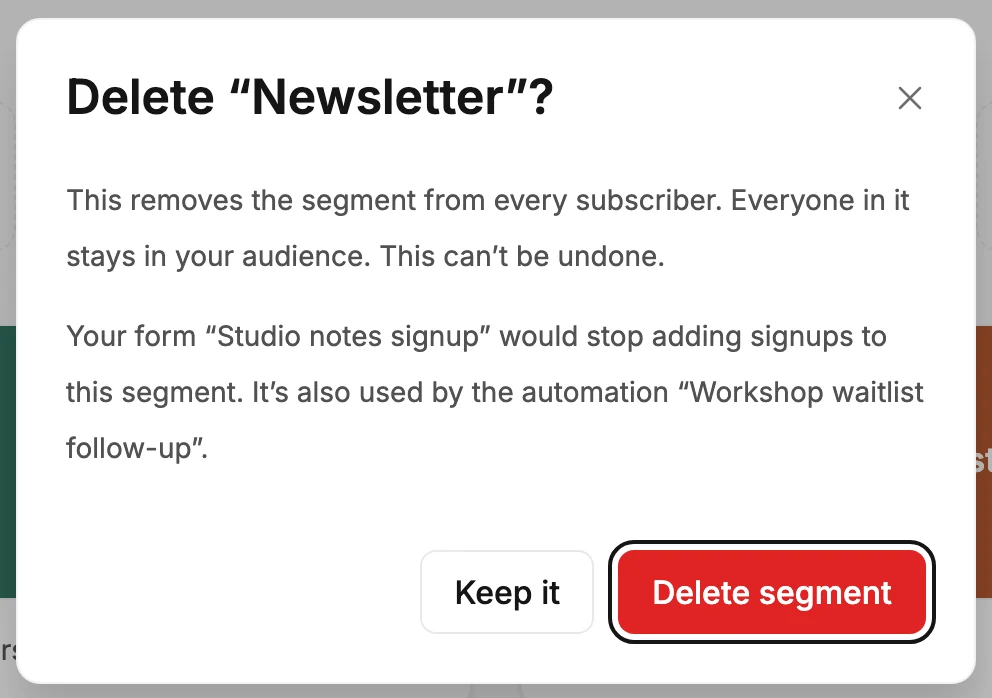
- The dialog asks Delete “Newsletter”? and says This removes the segment from every subscriber. Everyone in it stays in your audience. This can’t be undone. If an email, automation or form still uses the segment, a second paragraph names it and says what deleting would do to it. Select Delete segment, or Keep it to back out.
What changes
- The card disappears, and the name is free to use again.
- Every subscriber who was in it loses that label on their row. Nobody is deleted, and no status changes.
- Jounce works out who gets an email when it goes out. An email still to go out misses anyone it reaches only through this segment. One aimed at this segment alone goes to no one.
- An email set to leave this segment out doesn’t go out at all. Jounce can’t tell who was in a deleted segment, so it emails no one. The email shows Failed until you change who it leaves out and send it again. The rest of an A/B test that leaves it out never goes out. See Exclude people or segments.
- An automation that starts when someone is added to the segment doesn’t start for anyone new. Jounce skips a step that adds people to it.
- A Condition step that checks the segment stops each person who reaches that step, for good. The automation can’t launch or relaunch until you change that step. See The Condition step.
- A live form that adds signups to it still collects them, and they join your audience without the segment.
The dialog names what still uses the segment, like Your scheduled email “Spring sale” wouldn’t go out until you change who it leaves out. Change those before you delete.
If some subscribers still show it
If a message says Deleted. 3 subscribers still show the segment, select Try again. The segment is already gone from every list and menu, so nobody can send to it. A few rows just still show its label, and Try again clears them.
If it didn’t delete
The dialog stays open and says Couldn’t delete the segment. Nothing was removed — try again.
Who can delete
Managers and Admins. An Editor’s card menu holds Rename and the colors, with no Delete segment. See Why can’t I delete a segment?
Next step
An email aimed at it needs a new audience: Choose who gets your email.
More in this topic
Updated