

Change a subscriber’s email address
Short answer
On their page, select Change beside the address, type the new one, and select Change address. The person keeps their history, segments, and consent under the new address.
When you’re done, the same person sits on your list under the new address. Their segments, custom fields, consent record, and activity come with them. The Activity list gains a line, Email address changed. Every role can do this.
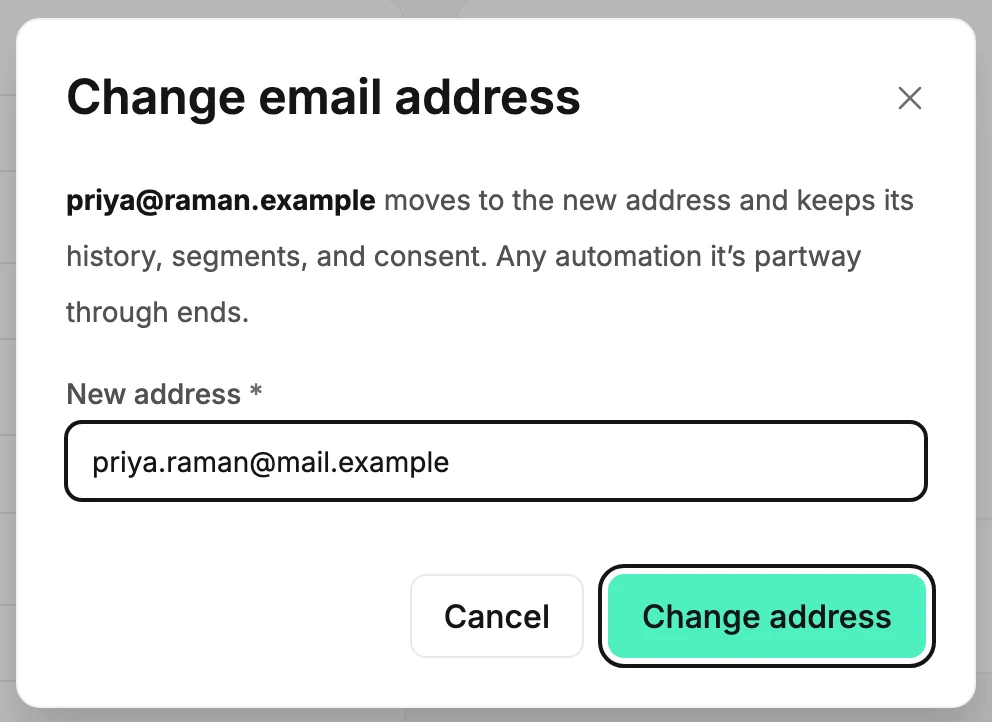
- Open Audience and select the person’s name. Their page opens.
- Select Change, beside their address under the title. The Change email address dialog opens with the cursor in New address.
- Type the new address and select Change address, or press Enter. The page reopens under the new address.
Cancel closes the dialog and changes nothing.
What moves with them
- Their name, custom fields, segments, and consent record, which is when and how they agreed to hear from you.
- Their opens, clicks, and the Activity list.
- Their location and time zone. A location you cleared stays cleared.
- Any email that can still go out follows them too: a draft, a scheduled email, or a send you can try again. If you picked them under People, or left them out under Won’t receive, that email uses the new address. That’s true even if the send steps still show the old one, and the send steps never add the old address back to your list. An email you already sent keeps the old address, since that’s where its mail went.
- Jounce remembers the old address. If they unsubscribe from an email you sent before the change, or mark it as spam, that still counts for them. So does an unsubscribe Zapier or the developer API sends for the old address. A bounce from the old address doesn’t change their status. It belongs to the old mailbox, not to them.
- The old address stays theirs. If you add it by hand, Jounce adds no one and tells you whose it is. An import sets it aside as replaced by a newer address. Zapier and the developer API can’t add it either. After you delete them, it’s still theirs, and an email to it under People goes to no one.
An automation they were partway through ends. It doesn’t start again for the new address, and they can’t enter that automation a second time.
What happens to their status
- Subscribed stays Subscribed.
- For most people, Bounced becomes Subscribed. The bounce belonged to the old mailbox, and fixing a bouncing address is what this is for. The exceptions are below.
- Unsubscribed and Complained stay as they are. Those belong to the person, not the mailbox, so a new address can’t undo them. If the new address unsubscribed from you before, the person becomes Unsubscribed.
- Unconfirmed stays Unconfirmed. The dialog adds The confirmation email goes to the new address. Jounce sends it there for you, with a fresh link. If it doesn’t arrive, select Resend confirmation beside their status label. Their row on the Subscribers page works too. See Resend a confirmation email.
What a bounce can hide
A status can say Bounced even if the person unsubscribed or never confirmed. Changing the address clears the bounce, but not those:
- If they unsubscribed or marked an email as spam, they become Unsubscribed or Complained, and the new address carries it. A spam complaint always stays, even if they confirmed again.
- If they unsubscribed and later confirmed their signup again, the confirmation counts, and they become Subscribed. If Jounce can’t tell which came last, they become Unsubscribed.
- If they never clicked their confirmation link, they become Unconfirmed. So does someone who signed up through a form or the developer API at an address that had already bounced. The dialog doesn’t say so, but Jounce emails the confirmation link to the new address. They become Subscribed when they click it.
People you or a teammate added by hand, by import, or by typing them into a send become Subscribed, unless a case above applies.
Changing an address keeps every unsubscribe Jounce has on record. Only the person can undo one, by confirming again; see Coming back after an unsubscribe, a bounce, or a complaint.
If the address is refused
A sentence under the field says why, and nothing has changed. The most common reason is that the new address already belongs to someone else on your list. Why can’t I change a subscriber’s email address? lists each message and what to do.
Next step
For someone Unconfirmed, the link is already on its way. To send another, see Resend a confirmation email.
More in this topic
Updated