

Jo’s chat on every page
Short answer
Jo, Jounce’s AI assistant, stands in a chat headed Jounce AI on the left of every page. It follows you from page to page and into the automation builder and the email and form editors, and it stays folded or open the way you leave it for the rest of the day.
On a computer, Jo’s chat stands on the left of every page, headed Jounce AI. Jo is the name Jounce’s AI assistant goes by. Ask it how to do something, how your emails are doing, or to start a new email, form, or automation.
What Jo says first
Each time you open Jounce, the first chat you see says hello by your first name, as in Hi Sam, I’m Jo. After that, each page opens on what Jo can do there. On Emails, that’s I can draft your next email, or tell you how one did.
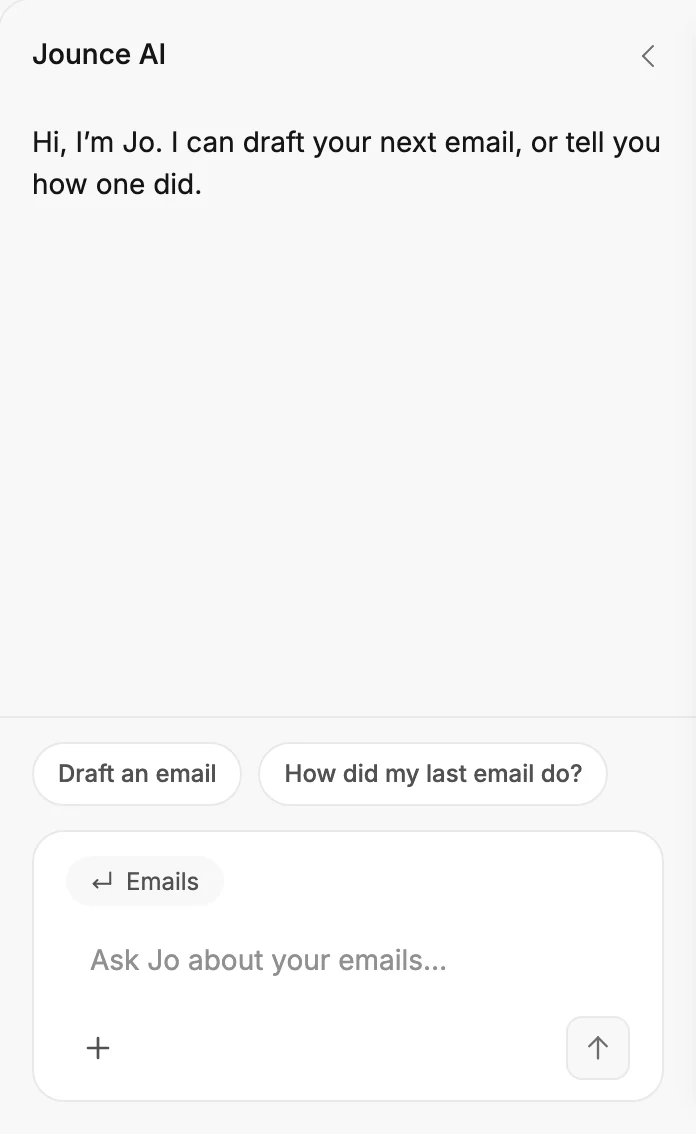
Two asks sit above the box, such as Draft an email and How did my last email do? Select one to send it as your first message. On a page with nothing on it yet, such as Emails before your first email, Jo offers first steps instead.
The label at the top left of the box names the page you’re on. Point at it to see what Jo can see. See How Jo uses your messages.
Add photos and files
+, at the bottom left of the box, adds photos and files to your next message. Upload from computer takes photos, PDFs and text files, and Your images takes photos already in Jounce. You can also drop a file on Jo’s chat, or paste a picture into the box.
Each waits above your words, even as you move from page to page. Point at one and select its × to take it out. Once you send, your files show above your message.
Jo can’t open them. Ask for an email, and its card takes them for Jounce to draft from. See Ask Jo to start an email, a form, or an automation. For a CSV file of contacts, Jo points you to Import contacts instead. See Ask Jo to add a contact, create a segment, or invite someone.
In an email’s editor, the chat reads your files for the email you’re on. See Edit your email with Jounce AI. A form’s editor has no +.
While Jo answers
A line in the chat names the step Jo is on, such as Searching the help center. While it works, the arrow in the box becomes Stop. Select it, or press Esc in the box, and Jo stops where it is. The chat says Stopped.
What Jo hands you comes as a card under its reply:
- A help article. Select it to read the article on help.jounce.com in a new tab.
- A page in Jounce, such as Open Emails. Select it to go there.
- A window in Jounce, such as Create a contact. Select it to open the window. On the window’s own page, Jo may open it for you first. See Ask Jo to add a contact, create a segment, or invite someone.
- A description to draft from, with a Generate button. See Ask Jo to start an email, a form, or an automation.
- Contact us, when you ask for a person. Select it to write to the Jounce team, with your question already in the message. See Get help from a person at Jounce.
- In a form’s editor, a card with a button to publish the form, then to copy its link or code. Open Settings opens the form’s settings. See Edit your form with Jounce AI.
One chat as you move around
Jo keeps one chat while Jounce is open. Move to another page, and the chat comes with you. Once you’ve asked something, a line such as Viewing Contacts marks the move.
Open an automation, and the chat comes into the builder too. Ask something there, and a line such as Editing Welcome series marks where Jo starts reading about that automation.
Back on a page, your next question starts under a line such as Back on Automations. Jo reads the chat under the latest line, with a short note of what came before it.
A very long chat starts over in place: a Fresh start line marks where, and your earlier messages stay above it.
Jo starts a fresh chat when you switch workspaces or reload the page.
Open an email or a form, and the chat comes there too: what you asked Jo stands at the top, then a line such as Editing Spring sale, then that editor’s own chat for changing the email or form. When you leave, what you asked there stays in Jo’s chat under that line. See Edit your email with Jounce AI.
In the email and form editors
In an email or a form, the chat works on the one you have open. Ask it about anything else, and Jo answers there, as it does on a page:
- How Jounce works or where something is, such as how do I schedule this email?
- Your own account, such as how was my latest form performing? or how many contacts you have.
- A page to go to, such as take me to my contacts.
- A window to open, such as adding a contact or inviting a teammate.
While Jo answers, the line under your message reads Asking Jo. Then its answer shows, with any cards under it:
- A page, such as Open Contacts, or one of your emails, forms, or automations. Select it to go there.
- A window, such as Create a contact. Select it to go to its page with the window open.
- A help article. Select it to read the article on help.jounce.com in a new tab.
- Contact us, when you ask for a person. Select it to write to the Jounce team.
Nothing moves until you select a card. A card that opens a page or a window takes you out of the editor. Jounce saves your email or form as you go, so it’s as you left it when you come back.
Jo never changes the open email or form. Ask for a change, a review, or advice on it, and Jounce does that work in the editor. Jo remembers what it answered there, so back on a page you can ask a follow-up.
Fold it away
Select Close chat, the × at the top right of the chat. Jo folds to a narrow edge reading Jounce AI, and the page takes the room. Select the edge to open Jo again.
Jounce remembers your choice on this computer for the rest of the day. Jo stays folded on every page, and an email or a form opens with Jo on its edge. The next day, Jo is open again.
If you fold Jo on three different days without opening it in between, Jounce takes the hint: Jo stays folded until you open it yourself.
On a narrow window
In a narrow window or on a phone, Jo folds into one row at the bottom of the page. The row reads the page’s own question, such as Ask Jo about your emails…. Select it, and Jo opens over the lower part of the page.

Close chat, at the top right, puts Jo back in its row. So does Esc, once Jo has finished answering. Jo closes too when you select a card that opens a page or a window, so you see it whole. Your chat stays where it was.
Where Jo isn’t
Settings fills the window, with no chat. So do full-screen views such as Preview, the send steps, an email’s results, and Start with AI. Back on a page, Jo is where you left it.
More in this topic
Also answered here
- can I ask jo other things while I edit an email
- why does jo only say hi once
- what does fresh start mean in the chat
Updated