

Leave a workspace
Short answer
At the bottom of the Members page, select Leave workspace, then confirm. You lose access right away, and everything you made stays behind.
When you’re done, Jounce says You left ⟨workspace⟩ and opens another of your workspaces. If it was your only one, you land on the card that says you’re not in a workspace. Every role can leave, Editors included.
- Select your avatar at the top right and choose All settings.
- Choose Members, then scroll to the last card, Leave this workspace.
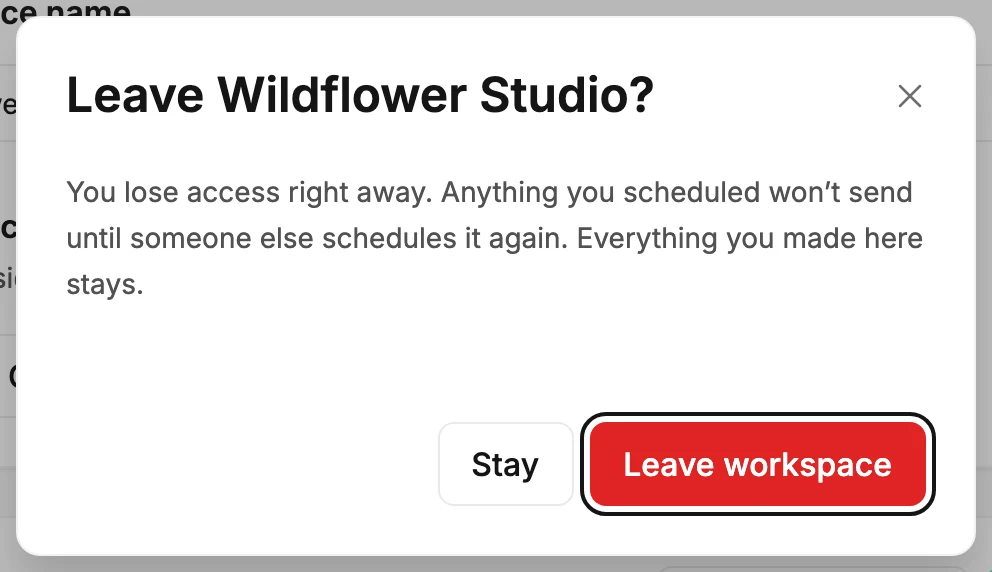
- Select Leave workspace. A dialog called Leave ⟨workspace⟩? opens and says what happens.
- Select Leave workspace in the dialog. Stay closes it with nothing changed.
What happens next
The dialog says: You lose access right away. So do apps you connected, like Zapier or Claude. Emails you scheduled won’t go out until someone schedules them again. Everything you made stays.
When you’re the workspace owner and another Admin is on the list, the dialog adds a line. You’re the owner, so replies and Jounce’s emails about this workspace will go to another admin. To choose who takes over, make that person the owner before you leave.
When this is the only workspace on your login and other people are in it, the dialog adds one more line. It’s your only workspace, so you’ll land on a page to create a new one or get invited back.
- An email you scheduled there doesn’t go out. Once its time comes, its label reads Failed, and an Admin or a Manager there can send it with Review and send. See Why did my send fail?
- Your emails, forms, automations, and subscribers stay with the workspace, under the people still in it.
- Apps you connected here, like Zapier or Claude, lose access at once.
- Your other workspaces aren’t touched. If you have none left, see Why does it say I’m not in a workspace?
- To come back, an Admin invites you again. See Accept an invite.
When Jounce refuses
- You’re the workspace’s last admin, and a workspace needs one. Nothing changed — make someone else an admin, then leave.
- You’re the only person here, so there’s no one to hand this workspace to. Nothing changed — invite someone and make them an admin, then leave.
Both mean the workspace would be left with no admin. See Why does it say a workspace needs at least one admin? If Jounce says That didn’t go through. You’re still a member — try again, select Leave workspace once more.
Next step
Just in the wrong workspace? Switch workspaces.
More in this topic
Updated