

The Your automations table
Short answer
The last section on the Automations tab lists every automation, ranked by emails sent over all time. Each row shows its status, who entered it in the range, who is in it now, its emails sent, and its open and click rates.
Your automations is the last section on the Automations tab. The note beside the heading reads Ranked by emails sent, all time. Every automation in the workspace has a row, drafts too.
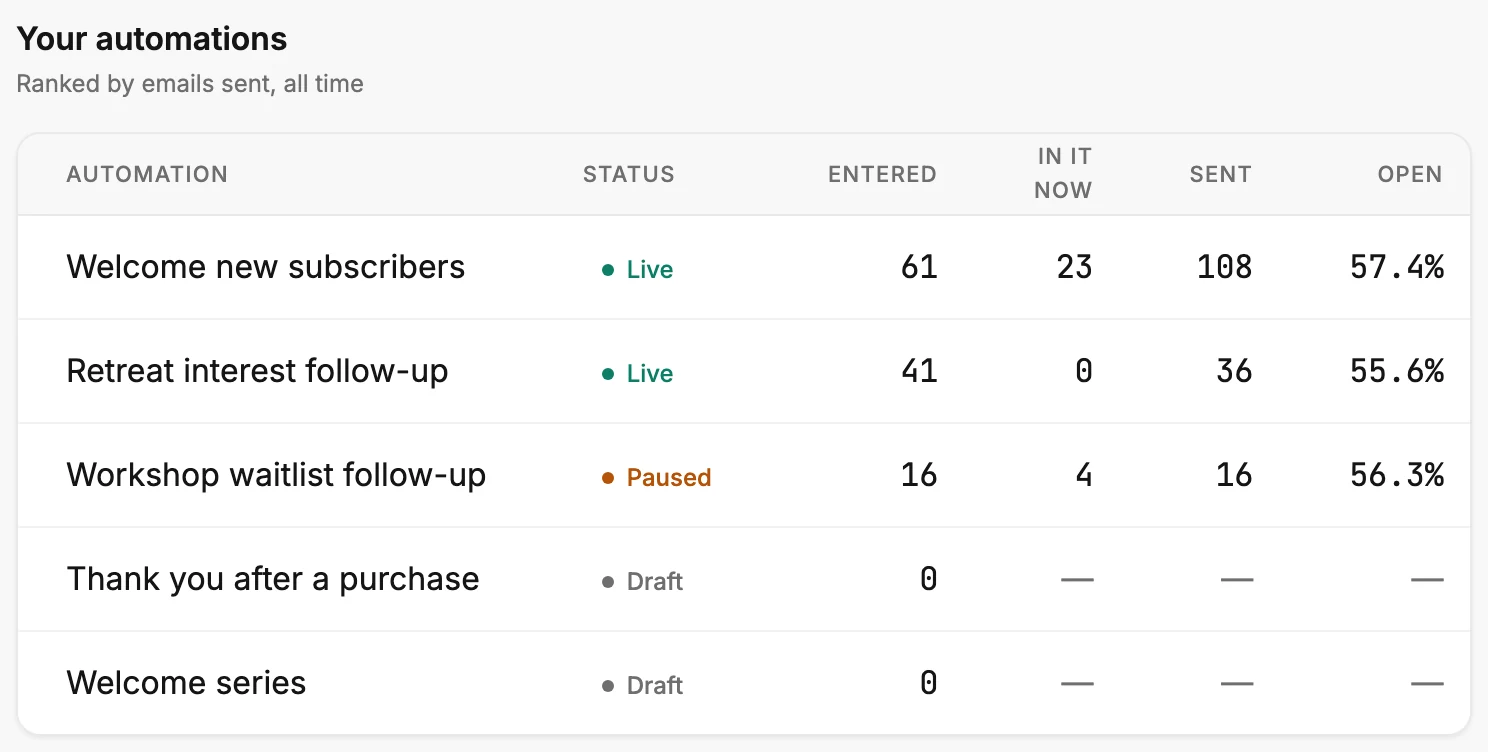
The columns
| Column | What it shows |
|---|---|
| Automation | The automation’s name. A long name is cut short with three dots. |
| Status | Live, Paused, Draft, or Ready, the same label it shows on the Automations page. |
| Entered | People who entered it inside the time range. |
| In it now | People inside it at this moment. |
| Sent | Every email it has sent, over all time. |
| Open | Its opens as a share of emails sent, over all time. |
| Click | Its clicks as a share of emails sent, over all time. |
In a narrow window, scroll the table sideways. Click is the last column.
Only Entered follows the time range at the top right. In it now, Sent, Open, and Click don’t, so they match the cards on each automation’s insights page. A draft’s dashes read 0 there.
The order
The automation that has sent the most emails sits at the top. When two tie, a launched one comes before a draft. After that, the newer one comes first. A draft has never run, so drafts sit at the bottom, with 0 under Entered and a dash in the other four number columns.
The Status column
Live means it is running and people can enter. Paused means the people inside stay where they are, and nobody new enters. Draft means it was never launched. Ready means it’s launched, but Jounce has switched automations off for now, for everyone who uses Jounce. It picks up on its own once Jounce switches automations back on. See Automation statuses.
A dash
A draft reads a dash under In it now, Sent, Open, and Click, because it has never run. A live automation with nobody inside reads 0 under In it now. A dash under Sent on a launched automation means some of its mail went out before Jounce started counting. See Dashes, plus signs, and the As of line.
Opening an automation
Select a row, or its name, to open that automation’s insights page. It shows the numbers step by step, with Back to analytics at the top left. See Open results from Analytics. To rename, edit, pause, or delete an automation, open Automations in the top bar.
More in this topic
Updated