

The Automations tab
Short answer
The Automations tab shows who entered an automation in the time range, and each automation’s sends, opens, and clicks over its whole life. It has four cards, a line with who is inside plus bounces, complaints, and unsubscribes, and a table of every automation ranked by emails sent.
Open Analytics in the top bar and choose the Automations tab. It adds up every automation in the workspace.
Only Entered follows the time range at the top right. It counts the people who went into an automation in that range. In automations now is a count of this moment. Every other number covers each automation’s whole life, and its label says so. What the Automations tab counts says what each number is made of.
The four cards
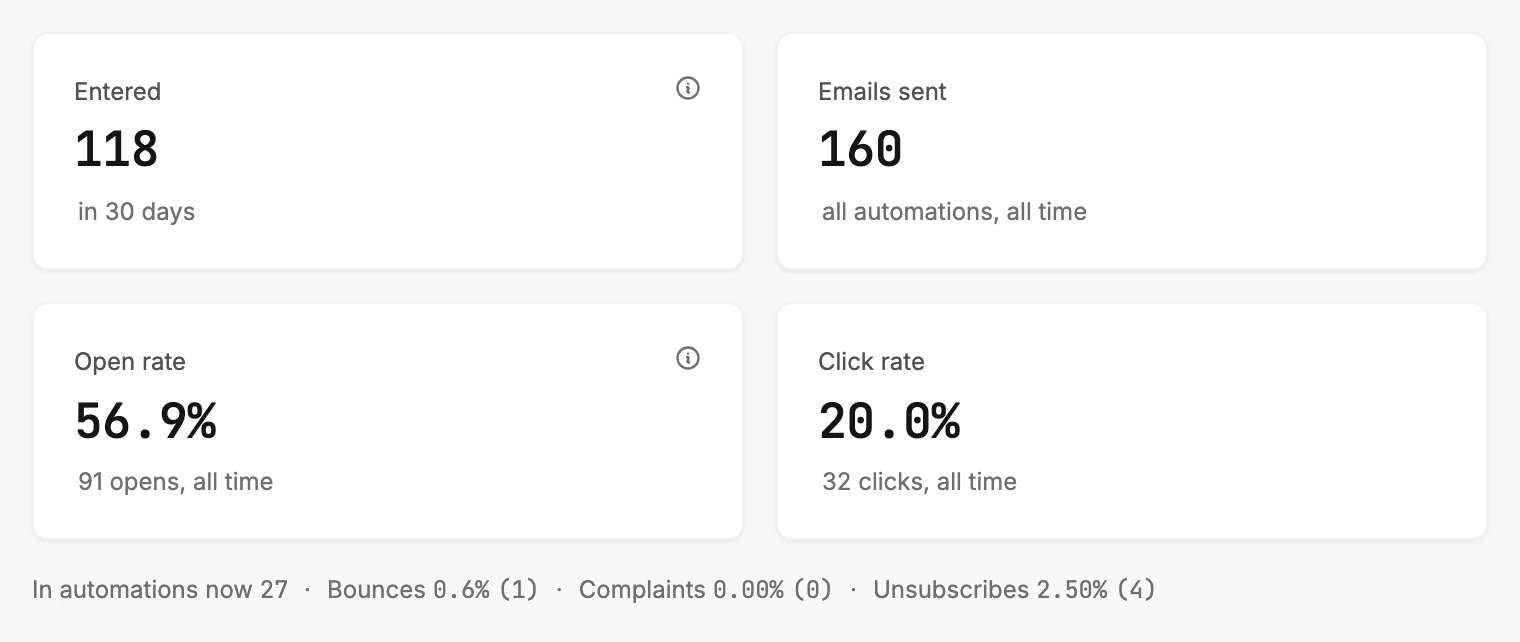
| Card | The number | The line under it |
|---|---|---|
| Entered | People who entered an automation inside the range. | The range, as in 30 days. |
| Emails sent | Every email every automation has sent. | all automations, all time. |
| Open rate | Opens as a share of emails sent, over all time. | The opens behind it, as 91 opens, all time. |
| Click rate | Clicks as a share of emails sent, over all time. | The clicks behind it, as 32 clicks, all time. |
Two cards have an ⓘ. Rest your pointer on one to read it, or tap it on a phone.
Entered reads Subscribers who entered an automation in this period. A person enters each automation only once.
Open rate reads Includes auto-opens from some mail apps. Some mail apps open an email for the reader, so opens run a little high. Clicks are the more reliable number.
When Entered reads 0, see Why is Entered 0 on the Automations tab?
No card on this tab compares with the period before, so there are no arrows. Change the range and only Entered moves.
In automations now, bounces, complaints, and unsubscribes
One small line sits under the cards. It reads In automations now 27 · Bounces 0.6% (1) · Complaints 0.00% (0) · Unsubscribes 2.50% (4).
In automations now counts the people inside an automation at this moment. They’re waiting on a delay or between steps. Unsubscribes is a share of every email sent. Bounces and Complaints are shares of the emails Jounce tracked bounces and complaints for. Each rate shows its count.
When there is more than one complaint and they reach 0.1%, the word Complaints turns amber. A second line appears: Complaints of 0.1% or more make every email you send harder to get into the inbox. Send only to people who asked for your emails.
One complaint on its own never turns it amber. See What the Automations tab counts for what to do.
Lines that say a number is incomplete
Under that line, up to three small notes can appear. Each one names a number that isn’t the whole story.
- This view covers 200 of your automations. You have more than 200, and Entered and In automations now show a plus sign.
- These numbers come from part of your send history, so counts are minimums and rates are estimates. The real sends, opens, clicks, bounces, complaints, and unsubscribes are at least this high.
- Jounce started counting sends after some of this mail went out, so totals and rates aren’t shown yet. Emails sent and every rate read a dash until Jounce counts those earlier sends. There’s nothing for you to do. The counts beside the rates are hidden.
See Dashes, plus signs, and the As of line.
Your automations
The last section is a table of every automation in the workspace. It’s ranked by emails sent over all time. Each row shows the automation’s name and status, who entered it in the range, and who is in it now. Next to those are its emails sent, open rate, and click rate.
Select a row to open that automation’s insights page. See The Your automations table. If an automation is missing, see Why isn’t my automation in the Your automations table?
When there is nothing to show
When the workspace has no automations, the tab shows one line: No automations yet. Under it: Set one up once and it runs on its own. Its sends, opens, and clicks land here, with a Create automation button. See Why is an Analytics tab empty?
When Jounce can’t load the numbers, a card reads Couldn’t load your automation analytics with a Try again button. Your automations are safe and keep running. See Why won’t Analytics load?
More in this topic
Updated