

The records Jounce asks you to add
Short answer
Two CNAMEs to copy, DKIM and SPF, plus a DMARC TXT only if your domain has none yet; if it has one, keep yours. Each has a Type, a Name, and a Value; at Cloudflare, add each CNAME with the proxy off.
After you select Authenticate domain, the Your own sending domain card lists the records to add. Each sits under its group name: DKIM, SPF, and DMARC. They stay on the card until the domain is authenticated. They never change, so you can come back for them any time.
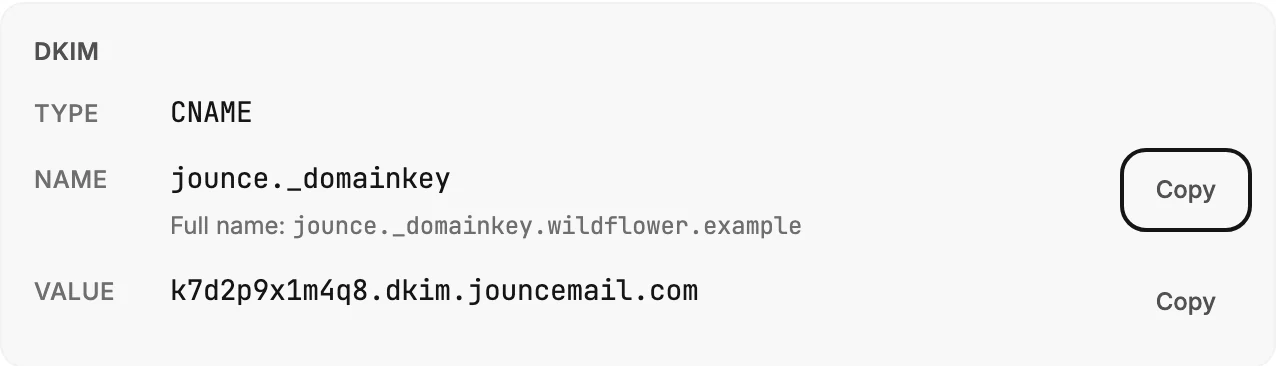
The three fields
| Field | What to enter |
|---|---|
| Type | CNAME or TXT. Choose the same type in your provider’s form. |
| Name | The short host shown, such as jounce._domainkey. Most providers add your domain to the end for you. The Full name line under it is for a provider that wants that. |
| Value | Where the record points. Copy it whole. |
Copy sits beside the Name and beside the Value. Each copies that one thing, and the button reads Copied for a moment.
Note If your provider adds the domain for you, type only the part the card shows. At those providers, a pasted full name ends up as jounce._domainkey.yourbrand.com.yourbrand.com, and that never confirms.
What each record does
- DKIM is a CNAME at
jounce._domainkey. It lets Jounce sign each email with your domain, so mailbox providers can check the email came from you. This is the record that turns the badge to Authenticated. - SPF is a CNAME at
jspf. It tells mailbox providers that Jounce is allowed to send for your domain. Jounce doesn’t wait for it before sending. Add it anyway; it helps your email pass more checks. - DMARC is a TXT at
_dmarcwith the valuev=DMARC1; p=none;. It tells mailbox providers your domain has a DMARC policy, one that only watches and blocks nothing. Jounce shows this row only when your domain has no DMARC record yet. If you already have one, keep yours; with two DMARC records, mailbox providers ignore both.
If your DNS is at Cloudflare
The card says it: add each CNAME with the proxy off, the grey cloud. With the proxy on, Cloudflare hides where the record points, and Jounce can’t confirm it.
More in this topic
Updated