

Connect Jounce to Zapier
Short answer
Select Open in Zapier on the Integrations page and pick Jounce inside a Zap. Zapier sends you to Jounce, where you tick the statement and select Allow full access.
When you’re done, Jounce is a connected account in Zapier that every Zap you build can use. Only an Admin or a Manager of the workspace can approve the connection.
- Select your avatar at the top right, choose All settings, then pick Integrations under Workspace.
- Select Open in Zapier on the Zapier card. Jounce’s page on Zapier opens in a new tab. There is nothing to set up in Jounce first.
- On Zapier, create a Zap, choose Jounce for a trigger or an action, and connect a Jounce account. Zapier opens Jounce in your browser.
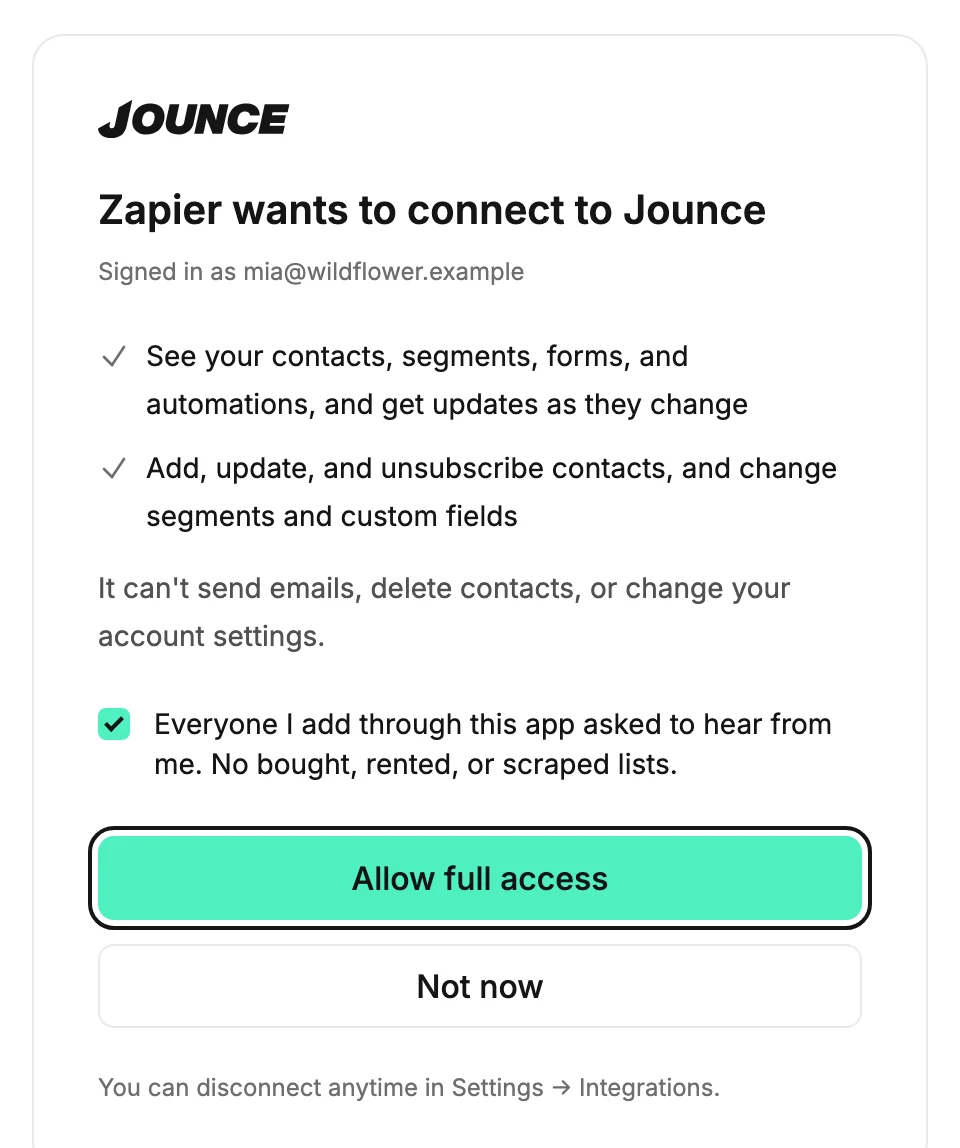
- Sign in if Jounce asks. The screen titled Zapier wants to connect to Jounce lists what Zapier will be allowed to do.
- Tick the statement Everyone I add through this app asked to hear from me. No bought, rented, or scraped lists.
- Select Allow full access. Jounce sends you back to Zapier, and the connection is done.

What happens next
- Zapier names the connection after your workspace, so two workspaces never look alike in its list.
- On the Integrations page, Zapier shows under Connected apps. It has a Full access badge and the date it connected.
- The connection reaches the workspace you were in when you approved it. For another workspace, switch to it first, then connect again from a Zap; see Switch workspaces.
- Zapier keeps the connection. Your other Zaps pick it from a list instead of asking you to approve again.
If the screen looks different
If you haven’t verified your email yet, Allow full access opens Verify your email to connect an app. Nothing is connected yet. Open the link Jounce sent you, select I’ve verified, then select Allow full access again.
An Editor sees no Allow full access button. The screen’s line reads Admins and managers approve connections. Ask one to connect Zapier; see Why does it say admins and managers approve connections?
If you were signed out, Jounce opens its sign-in page instead. Sign in, then start the connection again from Zapier. If the screen says the link is incomplete, see Why does it say this connection link is incomplete?
Next step
Build the Zap. The two most common are Start a Zap when someone joins, unsubscribes, or lands in a segment and Add subscribers to Jounce from another app.
More in this topic
Updated